NVIDIA Chat
NVIDIA LLM API 是一个代理 AI Inference Engine,提供来自各种提供商的广泛模型。
Spring AI 通过重用现有的 OpenAI 客户端与 NVIDIA LLM API 集成。
为此,您需要将 base-url 设置为 +https://integrate.api.nvidia.com+,选择提供的 LLM models 之一,并获取其 api-key。
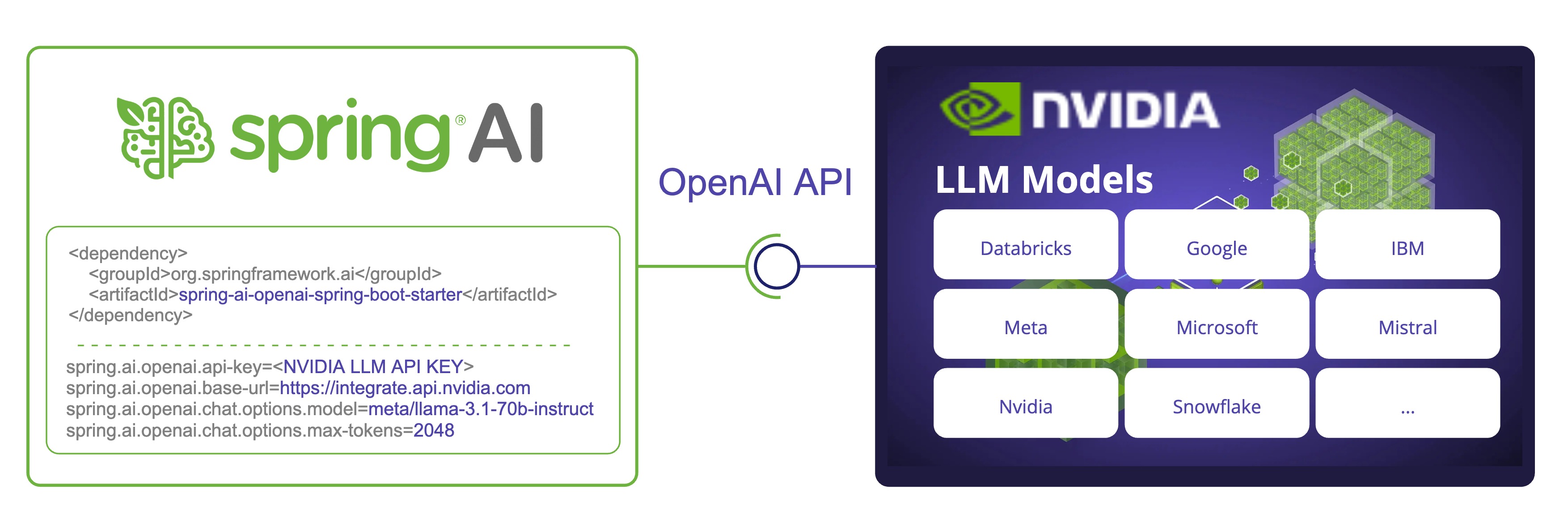
注意: NVIDIA LLM API 要求显式设置
max-tokens参数,否则将抛出服务器错误。
查看 NvidiaWithOpenAiChatModelIT.java 测试以了解在 Spring AI 中使用 NVIDIA LLM API 的示例。
Prerequisite
- 创建具有足够信用的 NVIDIA 账户。
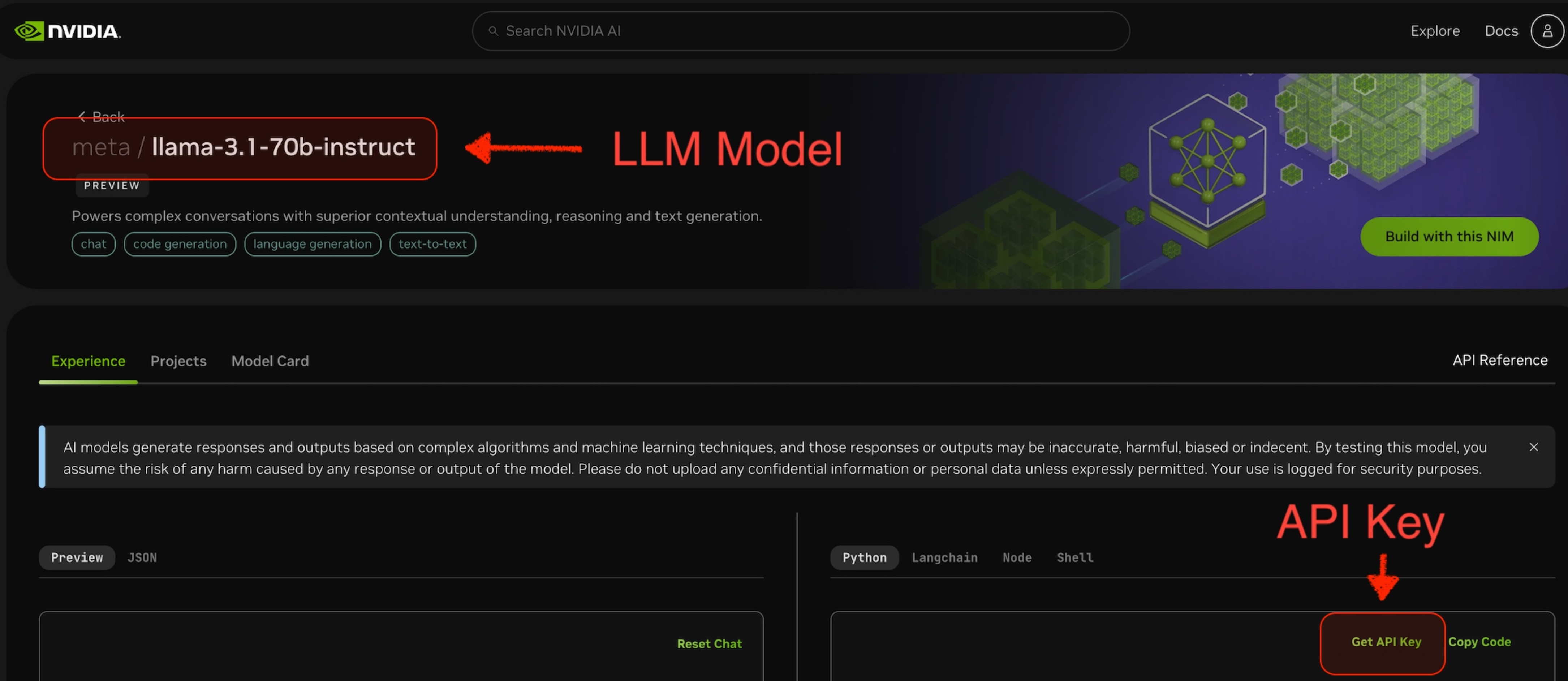
- 选择要使用的 LLM Model。例如,下面截图中的
meta/llama-3.1-70b-instruct。 - 从所选模型的页面,您可以获取访问该模型的
api-key。
Auto-configuration
注意: Spring AI auto-configuration、starter modules 的 artifact 名称发生了重大变化。 请参阅 upgrade notes 了解更多信息。
Spring AI 为 OpenAI Chat Client 提供 Spring Boot auto-configuration。
要启用它,请将以下依赖项添加到项目的 Maven pom.xml 文件中:
<dependency>
    <groupId>org.springframework.ai</groupId>
    <artifactId>spring-ai-starter-model-openai</artifactId>
</dependency>
或添加到您的 Gradle build.gradle 构建文件中。
dependencies {
    implementation 'org.springframework.ai:spring-ai-starter-model-openai'
}
提示: 请参阅 Dependency Management 部分,将 Spring AI BOM 添加到您的构建文件中。
Chat Properties
Retry Properties
前缀 spring.ai.retry 是用于配置 OpenAI chat model 的 retry 机制的属性前缀。
| Property | Description | Default |
|---|---|---|
| spring.ai.retry.max-attempts | 最大重试次数。 | 10 |
| spring.ai.retry.backoff.initial-interval | 指数退避策略的初始睡眠持续时间。 | 2 sec. |
| spring.ai.retry.backoff.multiplier | 退避间隔乘数。 | 5 |
| spring.ai.retry.backoff.max-interval | 最大退避持续时间。 | 3 min. |
| spring.ai.retry.on-client-errors | 如果为 false,抛出 NonTransientAiException,并且不对 4xx 客户端错误代码尝试重试 | false |
| spring.ai.retry.exclude-on-http-codes | 不应触发重试的 HTTP 状态代码列表(例如,抛出 NonTransientAiException)。 | empty |
| spring.ai.retry.on-http-codes | 应触发重试的 HTTP 状态代码列表(例如,抛出 TransientAiException)。 | empty |
Connection Properties
前缀 spring.ai.openai 是用于连接到 OpenAI 的属性前缀。
| Property | Description | Default |
|---|---|---|
| spring.ai.openai.base-url | 要连接到的 URL。必须设置为 +https://integrate.api.nvidia.com+ | - |
| spring.ai.openai.api-key | NVIDIA API Key | - |
Configuration Properties
注意: 现在通过前缀为
spring.ai.model.chat的顶级属性来配置 chat auto-configurations 的启用和禁用。要启用,spring.ai.model.chat=openai(默认启用)
要禁用,spring.ai.model.chat=none(或任何与 openai 不匹配的值)
此更改是为了允许配置多个模型。
前缀 spring.ai.openai.chat 是用于配置 OpenAI 的 chat model 实现的属性前缀。
| Property | Description | Default |
|---|---|---|
| spring.ai.openai.chat.enabled (Removed and no longer valid) | 启用 OpenAI chat model。 | true |
| spring.ai.model.chat | 启用 OpenAI chat model。 | openai |
| spring.ai.openai.chat.base-url | 可选覆盖 spring.ai.openai.base-url 以提供 chat 特定的 url。必须设置为 +https://integrate.api.nvidia.com+ | - |
| spring.ai.openai.chat.api-key | 可选覆盖 spring.ai.openai.api-key 以提供 chat 特定的 api-key | - |
| spring.ai.openai.chat.options.model | 要使用的 NVIDIA LLM model | - |
| spring.ai.openai.chat.options.temperature | 用于控制生成 completions 的明显创造力的采样 temperature。较高的值将使输出更加随机,而较低的值将使结果更加聚焦和确定性。不建议为同一个 completions 请求修改 temperature 和 top_p,因为这两个设置的交互很难预测。 | 0.8 |
| spring.ai.openai.chat.options.frequencyPenalty | 介于 -2.0 和 2.0 之间的数字。正值会根据到目前为止文本中现有频率对新 tokens 进行惩罚,降低模型逐字重复同一行的可能性。 | 0.0f |
| spring.ai.openai.chat.options.maxTokens | 在 chat completion 中生成的最大 tokens 数。输入 tokens 和生成 tokens 的总长度受模型上下文长度的限制。 | 注意:NVIDIA LLM API 要求显式设置 max-tokens 参数,否则将抛出服务器错误。 |
| spring.ai.openai.chat.options.n | 为每个输入消息生成多少个 chat completion 选择。请注意,您将根据所有选择中生成的 tokens 数收费。保持 n 为 1 以最小化成本。 | 1 |
| spring.ai.openai.chat.options.presencePenalty | 介于 -2.0 和 2.0 之间的数字。正值会根据到目前为止是否出现新 tokens 进行惩罚,增加模型讨论新主题的可能性。 | - |
| spring.ai.openai.chat.options.responseFormat | 指定模型必须输出的格式的对象。设置为 { "type": "json_object" } 启用 JSON mode,这保证了模型生成的消息是有效的 JSON。 | - |
| spring.ai.openai.chat.options.seed | 此功能处于 Beta 阶段。如果指定,我们的系统将尽最大努力进行确定性采样,以便使用相同的 seed 和参数重复请求应返回相同的结果。 | - |
| spring.ai.openai.chat.options.stop | 最多 4 个序列,API 将停止生成更多 tokens。 | - |
| spring.ai.openai.chat.options.topP | 除了 temperature 采样之外,还有一种称为 nucleus sampling 的替代方法,其中模型考虑具有 top_p 概率质量的 tokens 结果。因此,0.1 意味着只考虑包含 top 10% 概率质量的 tokens。我们通常建议修改此值或 temperature,但不要同时修改两者。 | - |
| spring.ai.openai.chat.options.tools | 模型可以调用的工具列表。目前,仅支持 functions 作为工具。使用此选项提供模型可能为其生成 JSON 输入的 functions 列表。 | - |
| spring.ai.openai.chat.options.toolChoice | 控制模型调用哪个(如果有)function。none 意味着模型不会调用 function,而是生成消息。auto 意味着模型可以在生成消息或调用 function 之间进行选择。通过 {"type: "function", "function": {"name": "my_function"}} 指定特定 function 会强制模型调用该 function。当没有 functions 时,none 是默认值。如果存在 functions,auto 是默认值。 | - |
| spring.ai.openai.chat.options.user | 代表您的最终用户的唯一标识符,可以帮助 OpenAI 监控和检测滥用。 | - |
| spring.ai.openai.chat.options.stream-usage | (仅用于 streaming)设置为添加包含整个请求的 token 使用统计信息的额外块。此块的 choices 字段是一个空数组,所有其他块也将包含一个 usage 字段,但值为 null。 | false |
| spring.ai.openai.chat.options.tool-names | 按名称标识的工具列表,用于在单个 prompt 请求中启用 function calling。具有这些名称的工具必须存在于 ToolCallback 注册表中。 | - |
| spring.ai.openai.chat.options.tool-callbacks | 要注册到 ChatModel 的 Tool Callbacks。 | - |
| spring.ai.openai.chat.options.internal-tool-execution-enabled | 如果为 false,Spring AI 不会在内部处理 tool calls,而是将它们代理到客户端。然后客户端负责处理 tool calls,将它们分派到适当的 function,并返回结果。如果为 true(默认值),Spring AI 将在内部处理 function calls。仅适用于支持 function calling 的 chat models | true |
提示: 所有前缀为
spring.ai.openai.chat.options的属性都可以通过在Prompt调用中添加请求特定的chat-options在运行时覆盖。
Runtime Options [[chat-options]]
OpenAiChatOptions.java 提供模型配置,例如要使用的模型、temperature、frequency penalty 等。
在启动时,可以使用 OpenAiChatModel(api, options) 构造函数或 spring.ai.openai.chat.options.* 属性来配置默认选项。
在运行时,您可以通过向 Prompt 调用添加新的、请求特定的选项来覆盖默认选项。
例如,要覆盖特定请求的默认模型和 temperature:
ChatResponse response = chatModel.call(
    new Prompt(
        "Generate the names of 5 famous pirates.",
        OpenAiChatOptions.builder()
            .model("mixtral-8x7b-32768")
            .temperature(0.4)
        .build()
    ));
提示: 除了模型特定的 OpenAiChatOptions 之外,您还可以使用可移植的 ChatOptions 实例,该实例使用 ChatOptions#builder() 创建。
Function Calling
NVIDIA LLM API 在选择支持它的模型时支持 Tool/Function calling。
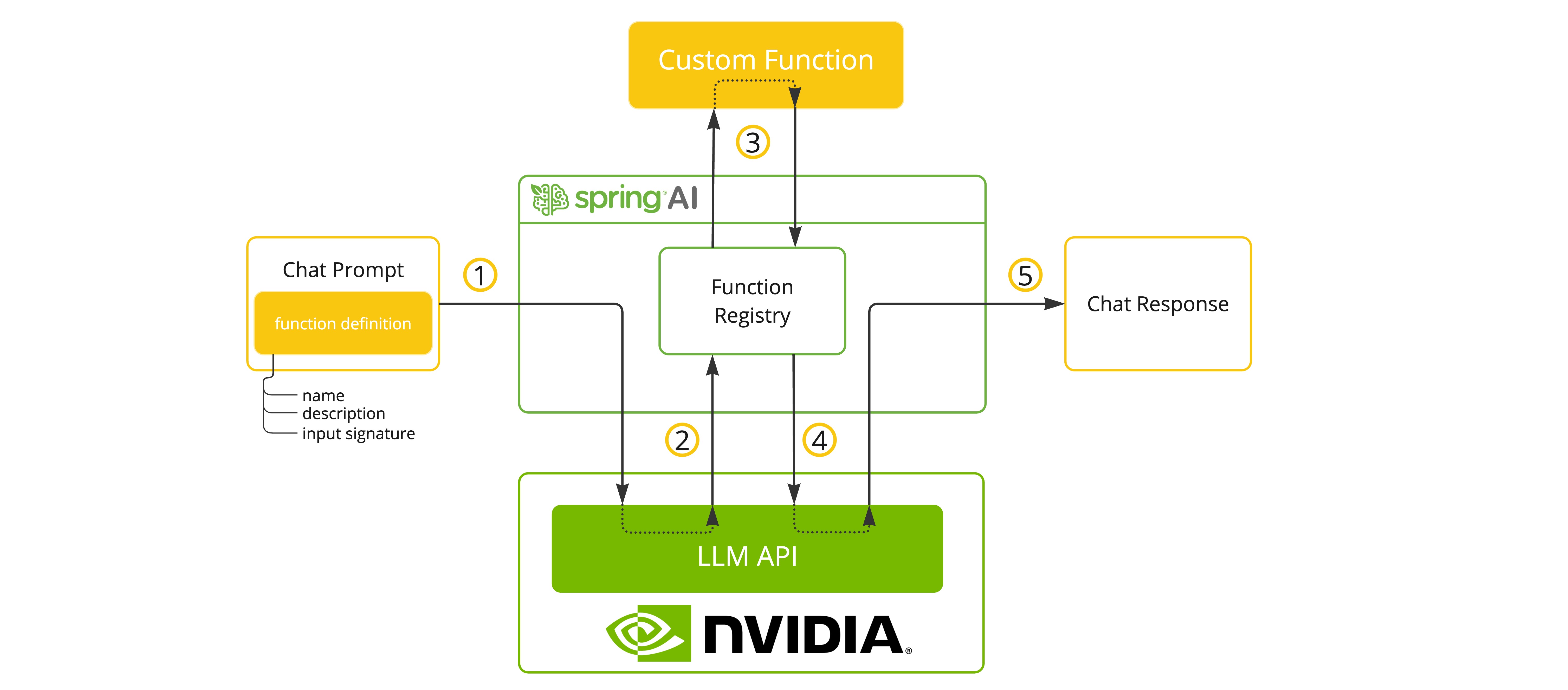
您可以将自定义 Java functions 注册到您的 ChatModel,并让提供的模型智能地选择输出包含参数以调用一个或多个已注册 functions 的 JSON 对象。 这是一种将 LLM 功能与外部工具和 APIs 连接的强大技术。
Tool Example
以下是如何在 Spring AI 中使用 NVIDIA LLM API function calling 的简单示例:
spring.ai.openai.api-key=${NVIDIA_API_KEY}
spring.ai.openai.base-url=https://integrate.api.nvidia.com
spring.ai.openai.chat.options.model=meta/llama-3.1-70b-instruct
spring.ai.openai.chat.options.max-tokens=2048
@SpringBootApplication
public class NvidiaLlmApplication {

    public static void main(String[] args) {
        SpringApplication.run(NvidiaLlmApplication.class, args);
    }

    @Bean
    CommandLineRunner runner(ChatClient.Builder chatClientBuilder) {
        return args -> {
            var chatClient = chatClientBuilder.build();

            var response = chatClient.prompt()
                .user("What is the weather in Amsterdam and Paris?")
                .functions("weatherFunction") // reference by bean name.
                .call()
                .content();

            System.out.println(response);
        };
    }

    @Bean
    @Description("Get the weather in location")
    public Function<WeatherRequest, WeatherResponse> weatherFunction() {
        return new MockWeatherService();
    }

    public static class MockWeatherService implements Function<WeatherRequest, WeatherResponse> {

        public record WeatherRequest(String location, String unit) {}
        public record WeatherResponse(double temp, String unit) {}

        @Override
        public WeatherResponse apply(WeatherRequest request) {
            double temperature = request.location().contains("Amsterdam") ? 20 : 25;
            return new WeatherResponse(temperature, request.unit);
        }
    }
}
在此示例中,当模型需要天气信息时,它将自动调用 weatherFunction bean,然后可以获取实时天气数据。
预期响应如下所示:"The weather in Amsterdam is currently 20 degrees Celsius, and the weather in Paris is currently 25 degrees Celsius."
了解更多关于 OpenAI Function Calling。
Sample Controller
Create 一个新的 Spring Boot 项目,并将 spring-ai-starter-model-openai 添加到您的 pom(或 gradle)依赖项中。
在 src/main/resources 目录下添加一个 application.properties 文件,以启用和配置 OpenAi chat model:
spring.ai.openai.api-key=${NVIDIA_API_KEY}
spring.ai.openai.base-url=https://integrate.api.nvidia.com
spring.ai.openai.chat.options.model=meta/llama-3.1-70b-instruct

# The NVIDIA LLM API doesn't support embeddings, so we need to disable it.
spring.ai.openai.embedding.enabled=false

# The NVIDIA LLM API requires this parameter to be set explicitly or server internal error will be thrown.
spring.ai.openai.chat.options.max-tokens=2048
提示: 将
api-key替换为您的 NVIDIA 凭据。
注意: NVIDIA LLM API 要求显式设置
max-token参数,否则将抛出服务器错误。
以下是一个简单的 @Controller 类的示例,它使用 chat model 进行文本生成。
@RestController
public class ChatController {

    private final OpenAiChatModel chatModel;

    @Autowired
    public ChatController(OpenAiChatModel chatModel) {
        this.chatModel = chatModel;
    }

    @GetMapping("/ai/generate")
    public Map generate(@RequestParam(value = "message", defaultValue = "Tell me a joke") String message) {
        return Map.of("generation", this.chatModel.call(message));
    }

    @GetMapping("/ai/generateStream")
	public Flux<ChatResponse> generateStream(@RequestParam(value = "message", defaultValue = "Tell me a joke") String message) {
        Prompt prompt = new Prompt(new UserMessage(message));
        return this.chatModel.stream(prompt);
    }
}