DeepSeek Chat
Spring AI 支持来自 DeepSeek 的各种 AI 语言模型。您可以与 DeepSeek 语言模型交互,并基于 DeepSeek 模型创建多语言对话助手。
Prerequisites
您需要使用 DeepSeek 创建 API key 才能访问 DeepSeek 语言模型。
在 DeepSeek registration page 创建账户,并在 API Keys page 生成 token。
Spring AI 项目定义了一个名为 spring.ai.deepseek.api-key 的配置属性,您应将其设置为从 API Keys 页面获得的 API Key 值。
您可以在 application.properties 文件中设置此配置属性:
spring.ai.deepseek.api-key=<your-deepseek-api-key>
为了在处理敏感信息(如 API keys)时增强安全性,您可以使用 Spring Expression Language (SpEL) 来引用自定义环境变量:
# In application.yml
spring:
  ai:
    deepseek:
      api-key: ${DEEPSEEK_API_KEY}
# In your environment or .env file
export DEEPSEEK_API_KEY=<your-deepseek-api-key>
您也可以在应用程序代码中以编程方式设置此配置:
// Retrieve API key from a secure source or environment variable
String apiKey = System.getenv("DEEPSEEK_API_KEY");
Add Repositories and BOM
Spring AI artifacts 发布在 Spring Milestone 和 Snapshot 仓库中。 请参阅 Artifact Repositories 部分,将这些仓库添加到您的构建系统中。
为了帮助进行依赖管理,Spring AI 提供了一个 BOM (bill of materials),以确保在整个项目中使用一致版本的 Spring AI。请参阅 Dependency Management 部分,将 Spring AI BOM 添加到您的构建系统中。
Auto-configuration
Spring AI 为 DeepSeek Chat Model 提供 Spring Boot auto-configuration。
要启用它,请将以下依赖项添加到项目的 Maven pom.xml 文件中:
<dependency>
    <groupId>org.springframework.ai</groupId>
    <artifactId>spring-ai-starter-model-deepseek</artifactId>
</dependency>
或添加到您的 Gradle build.gradle 文件中。
dependencies {
    implementation 'org.springframework.ai:spring-ai-starter-model-deepseek'
}
提示: 请参阅 Dependency Management 部分,将 Spring AI BOM 添加到您的构建文件中。
Chat Properties
Retry Properties
前缀 spring.ai.retry 是用于配置 DeepSeek Chat model 的 retry 机制的属性前缀。
| Property | Description | Default |
|---|---|---|
| spring.ai.retry.max-attempts | 最大重试次数。 | 10 |
| spring.ai.retry.backoff.initial-interval | 指数退避策略的初始睡眠持续时间。 | 2 sec. |
| spring.ai.retry.backoff.multiplier | 退避间隔乘数。 | 5 |
| spring.ai.retry.backoff.max-interval | 最大退避持续时间。 | 3 min. |
| spring.ai.retry.on-client-errors | 如果为 false,抛出 NonTransientAiException,并且不对 4xx 客户端错误代码尝试重试 | false |
| spring.ai.retry.exclude-on-http-codes | 不应触发重试的 HTTP 状态代码列表(例如,抛出 NonTransientAiException)。 | empty |
| spring.ai.retry.on-http-codes | 应触发重试的 HTTP 状态代码列表(例如,抛出 TransientAiException)。 | empty |
Connection Properties
前缀 spring.ai.deepseek 是用于连接到 DeepSeek 的属性前缀。
| Property | Description | Default |
|---|---|---|
| spring.ai.deepseek.base-url | 要连接到的 URL | +https://api.deepseek.com+ |
| spring.ai.deepseek.api-key | API Key | - |
Configuration Properties
前缀 spring.ai.deepseek.chat 是用于配置 DeepSeek 的 chat model 实现的属性前缀。
| Property | Description | Default |
|---|---|---|
| spring.ai.deepseek.chat.enabled | 启用 DeepSeek chat model。 | true |
| spring.ai.deepseek.chat.base-url | 可选覆盖 spring.ai.deepseek.base-url 以提供 chat 特定的 URL | +https://api.deepseek.com/+ |
| spring.ai.deepseek.chat.api-key | 可选覆盖 spring.ai.deepseek.api-key 以提供 chat 特定的 API key | - |
| spring.ai.deepseek.chat.completions-path | chat completions endpoint 的路径 | /chat/completions |
| spring.ai.deepseek.chat.beta-prefix-path | beta feature endpoint 的前缀路径 | /beta |
| spring.ai.deepseek.chat.model | 要使用的模型 ID。您可以使用 deepseek-reasoner 或 deepseek-chat。 | deepseek-chat |
| spring.ai.deepseek.chat.frequencyPenalty | 介于 -2.0 和 2.0 之间的数字。正值会根据到目前为止文本中现有频率对新 tokens 进行惩罚,降低模型逐字重复同一行的可能性。 | 0.0f |
| spring.ai.deepseek.chat.maxTokens | 在 chat completion 中生成的最大 tokens 数。输入 tokens 和生成 tokens 的总长度受模型上下文长度的限制。 | - |
| spring.ai.deepseek.chat.presencePenalty | 介于 -2.0 和 2.0 之间的数字。正值会根据到目前为止是否出现新 tokens 进行惩罚,增加模型讨论新主题的可能性。 | 0.0f |
| spring.ai.deepseek.chat.stop | 最多 4 个序列,API 将停止生成更多 tokens。 | - |
| spring.ai.deepseek.chat.temperature | 要使用的采样 temperature,介于 0 和 2 之间。较高的值(如 0.8)将使输出更加随机,而较低的值(如 0.2)将使输出更加聚焦和确定性。我们通常建议修改此值或 top_p,但不要同时修改两者。 | 1.0F |
| spring.ai.deepseek.chat.topP | 除了 temperature 采样之外,还有一种称为 nucleus sampling 的替代方法,其中模型考虑具有 top_p 概率质量的 tokens 结果。因此,0.1 意味着只考虑包含 top 10% 概率质量的 tokens。我们通常建议修改此值或 temperature,但不要同时修改两者。 | 1.0F |
| spring.ai.deepseek.chat.logprobs | 是否返回输出 tokens 的 log probabilities。如果为 true,返回消息内容中返回的每个输出 token 的 log probabilities。 | - |
| spring.ai.deepseek.chat.topLogprobs | 介于 0 和 20 之间的整数,指定在每个 token 位置返回的最可能的 tokens 数量,每个都有相关的 log probability。如果使用此参数,必须将 logprobs 设置为 true。 | - |
| spring.ai.deepseek.chat.tool-names | 按名称标识的工具列表,用于在单个 prompt 请求中启用 function calling。具有这些名称的工具必须存在于 ToolCallback 注册表中。 | - |
| spring.ai.deepseek.chat.tool-callbacks | 要注册到 ChatModel 的 Tool Callbacks。 | - |
| spring.ai.deepseek.chat.internal-tool-execution-enabled | 如果为 false,Spring AI 不会在内部处理 tool calls,而是将它们代理到客户端。然后客户端负责处理 tool calls,将它们分派到适当的 function,并返回结果。如果为 true(默认值),Spring AI 将在内部处理 function calls。仅适用于支持 function calling 的 chat models | true |
注意: 您可以为
ChatModel实现覆盖通用的spring.ai.deepseek.base-url和spring.ai.deepseek.api-key。 如果设置了spring.ai.deepseek.chat.base-url和spring.ai.deepseek.chat.api-key属性,则优先于通用属性。 如果您想对不同的模型和不同的模型端点使用不同的 DeepSeek 账户,这很有用。
提示: 所有前缀为
spring.ai.deepseek.chat的属性都可以通过在Prompt调用中添加请求特定的chat-options在运行时覆盖。
Runtime Options [[chat-options]]
DeepSeekChatOptions.java 提供模型配置,例如要使用的模型、temperature、frequency penalty 等。
在启动时,可以使用 DeepSeekChatModel(api, options) 构造函数或 spring.ai.deepseek.chat.* 属性来配置默认选项。
在运行时,您可以通过向 Prompt 调用添加新的、请求特定的选项来覆盖默认选项。
例如,要覆盖特定请求的默认模型和 temperature:
ChatResponse response = chatModel.call(
    new Prompt(
        "Generate the names of 5 famous pirates. Please provide the JSON response without any code block markers such as ```json```.",
        DeepSeekChatOptions.builder()
            .model("deepseek-chat")
            .temperature(0.8)
        .build()
    ));
提示: 除了模型特定的 DeepSeekChatOptions 之外,您还可以使用可移植的 ChatOptions 实例,该实例使用 ChatOptions#builder() 创建。
Sample Controller (Auto-configuration)
Create 一个新的 Spring Boot 项目,并将 spring-ai-starter-model-deepseek 添加到您的 pom(或 gradle)依赖项中。
在 src/main/resources 目录下添加一个 application.properties 文件,以启用和配置 DeepSeek Chat model:
spring.ai.deepseek.api-key=YOUR_API_KEY
spring.ai.deepseek.chat.model=deepseek-chat
spring.ai.deepseek.chat.temperature=0.8
提示: 将
api-key替换为您的 DeepSeek 凭据。
这将创建一个 DeepSeekChatModel 实现,您可以将其注入到您的类中。
以下是一个简单的 @Controller 类的示例,它使用 chat model 进行文本生成。
@RestController
public class ChatController {

    private final DeepSeekChatModel chatModel;

    @Autowired
    public ChatController(DeepSeekChatModel chatModel) {
        this.chatModel = chatModel;
    }

    @GetMapping("/ai/generate")
    public Map generate(@RequestParam(value = "message", defaultValue = "Tell me a joke") String message) {
        return Map.of("generation", chatModel.call(message));
    }

    @GetMapping("/ai/generateStream")
	public Flux<ChatResponse> generateStream(@RequestParam(value = "message", defaultValue = "Tell me a joke") String message) {
        var prompt = new Prompt(new UserMessage(message));
        return chatModel.stream(prompt);
    }
}
Chat Prefix Completion
chat prefix completion 遵循 Chat Completion API,用户提供 assistant 的 prefix message,让模型完成消息的其余部分。
使用 prefix completion 时,用户必须确保 messages 列表中的最后一条消息是 DeepSeekAssistantMessage。
以下是 chat prefix completion 的完整 Java 代码示例。在此示例中,我们将 assistant 的 prefix message 设置为 "python\n" 以强制模型输出 Python 代码,并将 stop 参数设置为 [''] 以防止模型进行额外解释。
@RestController
public class CodeGenerateController {

    private final DeepSeekChatModel chatModel;

    @Autowired
    public ChatController(DeepSeekChatModel chatModel) {
        this.chatModel = chatModel;
    }

    @GetMapping("/ai/generatePythonCode")
    public String generate(@RequestParam(value = "message", defaultValue = "Please write quick sort code") String message) {
		UserMessage userMessage = new UserMessage(message);
		Message assistantMessage = DeepSeekAssistantMessage.prefixAssistantMessage("```python\\n");
		Prompt prompt = new Prompt(List.of(userMessage, assistantMessage), ChatOptions.builder().stopSequences(List.of("```")).build());
		ChatResponse response = chatModel.call(prompt);
		return response.getResult().getOutput().getText();
    }
}
Reasoning Model (deepseek-reasoner)
deepseek-reasoner 是 DeepSeek 开发的 reasoning model。在提供最终答案之前,模型首先生成 Chain of Thought (CoT) 以提高其响应的准确性。我们的 API 为用户提供对 deepseek-reasoner 生成的 CoT 内容的访问,使他们能够查看、显示和提取它。
您可以使用 DeepSeekAssistantMessage 获取 deepseek-reasoner 生成的 CoT 内容。
public void deepSeekReasonerExample() {
    DeepSeekChatOptions promptOptions = DeepSeekChatOptions.builder()
            .model(DeepSeekApi.ChatModel.DEEPSEEK_REASONER.getValue())
            .build();
    Prompt prompt = new Prompt("9.11 and 9.8, which is greater?", promptOptions);
    ChatResponse response = chatModel.call(prompt);

    // Get the CoT content generated by deepseek-reasoner, only available when using deepseek-reasoner model
    DeepSeekAssistantMessage deepSeekAssistantMessage = (DeepSeekAssistantMessage) response.getResult().getOutput();
    String reasoningContent = deepSeekAssistantMessage.getReasoningContent();
    String text = deepSeekAssistantMessage.getText();
}
Reasoning Model Multi-round Conversation
在对话的每一轮中,模型输出 CoT (reasoning_content) 和最终答案 (content)。在下一轮对话中,之前轮次的 CoT 不会连接到上下文中,如下图所示:
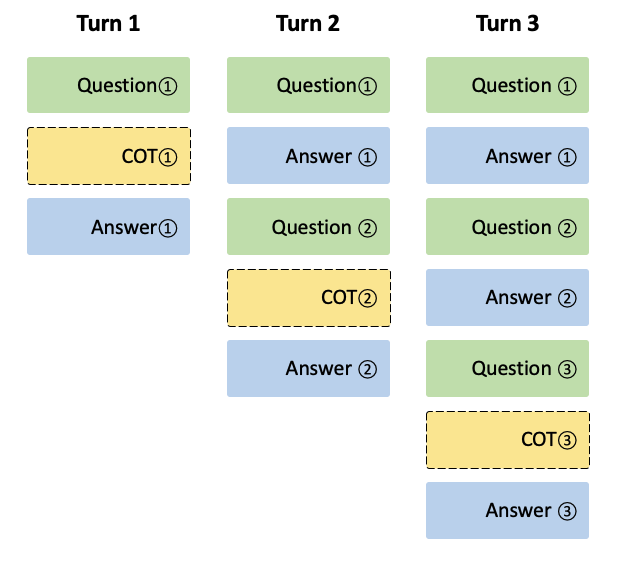
请注意,如果 reasoning_content 字段包含在输入消息序列中,API 将返回 400 错误。因此,您应该在发出 API 请求之前从 API 响应中删除 reasoning_content 字段,如 API 示例中所示。
public String deepSeekReasonerMultiRoundExample() {
    List<Message> messages = new ArrayList<>();
    messages.add(new UserMessage("9.11 and 9.8, which is greater?"));
    DeepSeekChatOptions promptOptions = DeepSeekChatOptions.builder()
            .model(DeepSeekApi.ChatModel.DEEPSEEK_REASONER.getValue())
            .build();

    Prompt prompt = new Prompt(messages, promptOptions);
    ChatResponse response = chatModel.call(prompt);

    DeepSeekAssistantMessage deepSeekAssistantMessage = (DeepSeekAssistantMessage) response.getResult().getOutput();
    String reasoningContent = deepSeekAssistantMessage.getReasoningContent();
    String text = deepSeekAssistantMessage.getText();

    messages.add(AssistantMessage.builder().content(Objects.requireNonNull(text)).build());
    messages.add(new UserMessage("How many Rs are there in the word 'strawberry'?"));
    Prompt prompt2 = new Prompt(messages, promptOptions);
    ChatResponse response2 = chatModel.call(prompt2);

    DeepSeekAssistantMessage deepSeekAssistantMessage2 = (DeepSeekAssistantMessage) response2.getResult().getOutput();
    String reasoningContent2 = deepSeekAssistantMessage2.getReasoningContent();
    return deepSeekAssistantMessage2.getText();
}
Manual Configuration
DeepSeekChatModel 实现了 ChatModel 和 StreamingChatModel,并使用 low-level-api 连接到 DeepSeek 服务。
将 spring-ai-deepseek 依赖项添加到项目的 Maven pom.xml 文件中:
<dependency>
    <groupId>org.springframework.ai</groupId>
    <artifactId>spring-ai-deepseek</artifactId>
</dependency>
或添加到您的 Gradle build.gradle 文件中。
dependencies {
    implementation 'org.springframework.ai:spring-ai-deepseek'
}
提示: 请参阅 Dependency Management 部分,将 Spring AI BOM 添加到您的构建文件中。
接下来,创建一个 DeepSeekChatModel 并将其用于文本生成:
DeepSeekApi deepSeekApi = DeepSeekApi.builder()
        .apiKey(System.getenv("DEEPSEEK_API_KEY"))
        .build();
DeepSeekChatOptions options = DeepSeekChatOptions.builder()
        .model(DeepSeekApi.ChatModel.DEEPSEEK_CHAT.getValue())
        .temperature(0.4)
        .maxTokens(200)
        .build();
DeepSeekChatModel chatModel = DeepSeekChatModel.builder()
        .deepSeekApi(deepSeekApi)
        .defaultOptions(options)
        .build();
ChatResponse response = chatModel.call(
    new Prompt("Generate the names of 5 famous pirates."));

// Or with streaming responses
Flux<ChatResponse> streamResponse = chatModel.stream(
    new Prompt("Generate the names of 5 famous pirates."));
DeepSeekChatOptions 提供 chat 请求的配置信息。
DeepSeekChatOptions.Builder 是一个流畅的选项构建器。
Low-level DeepSeekApi Client [[low-level-api]]
DeepSeekApi 是 DeepSeek API 的轻量级 Java 客户端。
以下是如何以编程方式使用 API 的简单示例:
DeepSeekApi deepSeekApi =
    new DeepSeekApi(System.getenv("DEEPSEEK_API_KEY"));

ChatCompletionMessage chatCompletionMessage =
    new ChatCompletionMessage("Hello world", Role.USER);

// Sync request
ResponseEntity<ChatCompletion> response = deepSeekApi.chatCompletionEntity(
    new ChatCompletionRequest(List.of(chatCompletionMessage), DeepSeekApi.ChatModel.DEEPSEEK_CHAT.getValue(), 0.7, false));

// Streaming request
Flux<ChatCompletionChunk> streamResponse = deepSeekApi.chatCompletionStream(
    new ChatCompletionRequest(List.of(chatCompletionMessage), DeepSeekApi.ChatModel.DEEPSEEK_CHAT.getValue(), 0.7, true));
请参阅 DeepSeekApi.java 的 JavaDoc 了解更多信息。
DeepSeekApi Samples
- DeepSeekApiIT.java 测试提供了一些如何使用轻量级库的一般示例。