Ollama Chat
使用 Ollama 您可以在本地运行各种 Large Language Models (LLMs) 并从它们生成文本。
Spring AI 通过 OllamaChatModel API 支持 Ollama chat completion 功能。
提示: Ollama 还提供 OpenAI API 兼容的 endpoint。 OpenAI API compatibility 部分解释了如何使用 Spring AI OpenAI 连接到 Ollama 服务器。
Prerequisites
您首先需要访问 Ollama 实例。有几种选择,包括以下:
- 在本地机器上下载并安装 Ollama。
- 通过 Testcontainers 配置和运行 Ollama。
- 通过 Kubernetes Service Bindings 绑定到 Ollama 实例。
您可以从 Ollama model library 拉取要在应用程序中使用的模型:
ollama pull <model-name>
您也可以拉取数千个免费的 GGUF Hugging Face Models:
ollama pull hf.co/<username>/<model-repository>
或者,您可以启用自动下载任何所需模型的选项:Auto-pulling Models。
Auto-configuration
注意: Spring AI auto-configuration、starter modules 的 artifact 名称发生了重大变化。 请参阅 upgrade notes 了解更多信息。
Spring AI 为 Ollama chat 集成提供 Spring Boot auto-configuration。
要启用它,请将以下依赖项添加到项目的 Maven pom.xml 或 Gradle build.gradle 构建文件中:
<dependency>
   <groupId>org.springframework.ai</groupId>
   <artifactId>spring-ai-starter-model-ollama</artifactId>
</dependency>
提示: 请参阅 Dependency Management 部分,将 Spring AI BOM 添加到您的构建文件中。
Base Properties
前缀 spring.ai.ollama 是用于配置与 Ollama 连接的属性前缀。
| Property | Description | Default |
|---|---|---|
| spring.ai.ollama.base-url | Ollama API 服务器运行的 Base URL。 | http://localhost:11434 |
以下是用于初始化 Ollama 集成和 auto-pulling models 的属性。
| Property | Description | Default |
|---|---|---|
| spring.ai.ollama.init.pull-model-strategy | 是否在启动时拉取模型以及如何拉取。 | never |
| spring.ai.ollama.init.timeout | 等待模型被拉取的时间。 | 5m |
| spring.ai.ollama.init.max-retries | 模型拉取操作的最大重试次数。 | 0 |
| spring.ai.ollama.init.chat.include | 在初始化任务中包含此类型的模型。 | true |
| spring.ai.ollama.init.chat.additional-models | 除了通过默认属性配置的模型之外,还要初始化的其他模型。 | [] |
Chat Properties
注意: 现在通过前缀为
spring.ai.model.chat的顶级属性来配置 chat auto-configurations 的启用和禁用。要启用,spring.ai.model.chat=ollama(默认启用)
要禁用,spring.ai.model.chat=none(或任何与 ollama 不匹配的值)
此更改是为了允许配置多个模型。
前缀 spring.ai.ollama.chat.options 是用于配置 Ollama chat model 的属性前缀。
它包括 Ollama 请求(高级)参数,例如 model、keep-alive 和 format,以及 Ollama 模型 options 属性。
以下是 Ollama chat model 的高级请求参数:
| Property | Description | Default |
|---|---|---|
| spring.ai.ollama.chat.enabled (Removed and no longer valid) | 启用 Ollama chat model。 | true |
| spring.ai.model.chat | 启用 Ollama chat model。 | ollama |
| spring.ai.ollama.chat.options.model | 要使用的 supported model 名称。 | mistral |
| spring.ai.ollama.chat.options.format | 返回响应的格式。目前,唯一接受的值是 json | - |
| spring.ai.ollama.chat.options.keep_alive | 控制模型在请求后保持在内存中的时间 | 5m |
其余的 options 属性基于 Ollama Valid Parameters and Values 和 Ollama Types。默认值基于 Ollama Types Defaults。
| Property | Description | Default |
|---|---|---|
| spring.ai.ollama.chat.options.numa | 是否使用 NUMA。 | false |
| spring.ai.ollama.chat.options.num-ctx | 设置用于生成下一个 token 的上下文窗口大小。 | 2048 |
| spring.ai.ollama.chat.options.num-batch | Prompt 处理的最大批次大小。 | 512 |
| spring.ai.ollama.chat.options.num-gpu | 要发送到 GPU(s) 的层数。在 macOS 上,默认值为 1 以启用 metal 支持,0 以禁用。这里的 1 表示 NumGPU 应该动态设置 | -1 |
| spring.ai.ollama.chat.options.main-gpu | 使用多个 GPU 时,此选项控制哪个 GPU 用于小张量,对于这些张量,在所有 GPU 之间分割计算的开销是不值得的。有问题的 GPU 将使用稍多的 VRAM 来存储临时结果的暂存缓冲区。 | 0 |
| spring.ai.ollama.chat.options.low-vram | - | false |
| spring.ai.ollama.chat.options.f16-kv | - | true |
| spring.ai.ollama.chat.options.logits-all | 返回所有 tokens 的 logits,而不仅仅是最后一个。要启用 completions 返回 logprobs,这必须为 true。 | - |
| spring.ai.ollama.chat.options.vocab-only | 仅加载词汇表,不加载权重。 | - |
| spring.ai.ollama.chat.options.use-mmap | 默认情况下,模型被映射到内存中,这允许系统根据需要仅加载模型的必要部分。但是,如果模型大于您的总 RAM 量,或者您的系统可用内存不足,使用 mmap 可能会增加页面输出的风险,从而对性能产生负面影响。禁用 mmap 会导致加载时间变慢,但如果您不使用 mlock,可能会减少页面输出。请注意,如果模型大于总 RAM 量,关闭 mmap 将完全阻止模型加载。 | null |
| spring.ai.ollama.chat.options.use-mlock | 将模型锁定在内存中,防止在内存映射时被交换出去。这可以提高性能,但通过需要更多 RAM 来运行并可能减慢加载时间,因为模型加载到 RAM 中,从而牺牲了内存映射的一些优势。 | false |
| spring.ai.ollama.chat.options.num-thread | 设置计算期间要使用的线程数。默认情况下,Ollama 会检测此值以获得最佳性能。建议将此值设置为系统具有的物理 CPU 核心数(而不是逻辑核心数)。0 = 让运行时决定 | 0 |
| spring.ai.ollama.chat.options.num-keep | - | 4 |
| spring.ai.ollama.chat.options.seed | 设置用于生成的随机数种子。将此设置为特定数字将使模型为相同的 prompt 生成相同的文本。 | -1 |
| spring.ai.ollama.chat.options.num-predict | 生成文本时预测的最大 tokens 数。(-1 = 无限生成,-2 = 填充上下文) | -1 |
| spring.ai.ollama.chat.options.top-k | 减少生成无意义的可能性。较高的值(例如,100)将提供更多样化的答案,而较低的值(例如,10)将更加保守。 | 40 |
| spring.ai.ollama.chat.options.top-p | 与 top-k 一起工作。较高的值(例如,0.95)将导致更多样化的文本,而较低的值(例如,0.5)将生成更加聚焦和保守的文本。 | 0.9 |
| spring.ai.ollama.chat.options.min-p | top_p 的替代方案,旨在确保质量和多样性的平衡。参数 p 表示 token 被考虑的最小概率,相对于最可能的 token 的概率。例如,p=0.05 且最可能的 token 的概率为 0.9,则值小于 0.045 的 logits 将被过滤掉。 | 0.0 |
| spring.ai.ollama.chat.options.tfs-z | Tail-free sampling 用于减少输出中不太可能的 tokens 的影响。较高的值(例如,2.0)将减少影响更多,而值为 1.0 则禁用此设置。 | 1.0 |
| spring.ai.ollama.chat.options.typical-p | - | 1.0 |
| spring.ai.ollama.chat.options.repeat-last-n | 设置模型回看多远以防止重复。(默认值:64,0 = 禁用,-1 = num_ctx) | 64 |
| spring.ai.ollama.chat.options.temperature | 模型的 temperature。增加 temperature 将使模型回答更具创造性。 | 0.8 |
| spring.ai.ollama.chat.options.repeat-penalty | 设置对重复的惩罚强度。较高的值(例如,1.5)将更强烈地惩罚重复,而较低的值(例如,0.9)将更加宽松。 | 1.1 |
| spring.ai.ollama.chat.options.presence-penalty | - | 0.0 |
| spring.ai.ollama.chat.options.frequency-penalty | - | 0.0 |
| spring.ai.ollama.chat.options.mirostat | 启用 Mirostat sampling 以控制困惑度。(默认值:0,0 = 禁用,1 = Mirostat,2 = Mirostat 2.0) | 0 |
| spring.ai.ollama.chat.options.mirostat-tau | 控制输出的一致性和多样性之间的平衡。较低的值将导致更加聚焦和一致的文本。 | 5.0 |
| spring.ai.ollama.chat.options.mirostat-eta | 影响算法对生成文本反馈的响应速度。较低的学习率将导致较慢的调整,而较高的学习率将使算法更具响应性。 | 0.1 |
| spring.ai.ollama.chat.options.penalize-newline | - | true |
| spring.ai.ollama.chat.options.stop | 设置要使用的停止序列。遇到此模式时,LLM 将停止生成文本并返回。可以通过在 modelfile 中指定多个单独的 stop 参数来设置多个停止模式。 | - |
| spring.ai.ollama.chat.options.tool-names | 按名称标识的工具列表,用于在单个 prompt 请求中启用 function calling。具有这些名称的工具必须存在于 ToolCallback 注册表中。 | - |
| spring.ai.ollama.chat.options.tool-callbacks | 要注册到 ChatModel 的 Tool Callbacks。 | - |
| spring.ai.ollama.chat.options.internal-tool-execution-enabled | 如果为 false,Spring AI 不会在内部处理 tool calls,而是将它们代理到客户端。然后客户端负责处理 tool calls,将它们分派到适当的 function,并返回结果。如果为 true(默认值),Spring AI 将在内部处理 function calls。仅适用于支持 function calling 的 chat models | true |
提示: 所有前缀为
spring.ai.ollama.chat.options的属性都可以通过在Prompt调用中添加请求特定的chat-options在运行时覆盖。
Runtime Options [[chat-options]]
OllamaChatOptions.java 类提供模型配置,例如要使用的模型、temperature、thinking mode 等。
重要:
OllamaOptions类已被弃用。对于 chat models 使用OllamaChatOptions,对于 embedding models 使用OllamaEmbeddingOptions。新类提供类型安全、模型特定的配置选项。
在启动时,可以使用 OllamaChatModel(api, options) 构造函数或 spring.ai.ollama.chat.options.* 属性来配置默认选项。
在运行时,您可以通过向 Prompt 调用添加新的、请求特定的选项来覆盖默认选项。
例如,要覆盖特定请求的默认模型和 temperature:
ChatResponse response = chatModel.call(
    new Prompt(
        "Generate the names of 5 famous pirates.",
        OllamaChatOptions.builder()
            .model(OllamaModel.LLAMA3_1)
            .temperature(0.4)
            .build()
    ));
提示: 除了模型特定的 OllamaChatOptions 之外,您还可以使用可移植的 ChatOptions 实例,该实例使用 ChatOptions#builder() 创建。
[[auto-pulling-models]]
Auto-pulling Models
Spring AI Ollama 可以在 Ollama 实例中不可用时自动拉取模型。 此功能对于开发和测试以及将应用程序部署到新环境特别有用。
提示: 您还可以按名称拉取数千个免费的 GGUF Hugging Face Models。
有三种拉取模型的策略:
always(在PullModelStrategy.ALWAYS中定义):始终拉取模型,即使它已经可用。用于确保您使用的是模型的最新版本。when_missing(在PullModelStrategy.WHEN_MISSING中定义):仅在模型尚不可用时拉取。这可能导致使用较旧版本的模型。never(在PullModelStrategy.NEVER中定义):从不自动拉取模型。
注意: 由于下载模型时可能出现延迟,不建议在生产环境中使用自动拉取。相反,请考虑提前评估和预下载必要的模型。
所有通过配置属性和默认选项定义的模型都可以在启动时自动拉取。 您可以使用配置属性配置拉取策略、超时和最大重试次数:
spring:
  ai:
    ollama:
      init:
        pull-model-strategy: always
        timeout: 60s
        max-retries: 1
注意: 应用程序在 Ollama 中所有指定的模型可用之前不会完成初始化。根据模型大小和互联网连接速度,这可能会显著减慢应用程序的启动时间。
您可以在启动时初始化其他模型,这对于在运行时动态使用的模型很有用:
spring:
  ai:
    ollama:
      init:
        pull-model-strategy: always
        chat:
          additional-models:
            - llama3.2
            - qwen2.5
如果您想仅对特定类型的模型应用拉取策略,可以从初始化任务中排除 chat models:
spring:
  ai:
    ollama:
      init:
        pull-model-strategy: always
        chat:
          include: false
此配置将拉取策略应用于除 chat models 之外的所有模型。
Function Calling
您可以将自定义 Java functions 注册到 OllamaChatModel,并让 Ollama 模型智能地选择输出包含参数以调用一个或多个已注册 functions 的 JSON 对象。
这是一种将 LLM 功能与外部工具和 APIs 连接的强大技术。
了解更多关于 Tool Calling。
提示: 您需要 Ollama 0.2.8 或更高版本来使用 function calling 功能,需要 Ollama 0.4.6 或更高版本来在 streaming 模式中使用它们。
Thinking Mode (Reasoning)
Ollama 支持推理模型的 thinking mode,可以在提供最终答案之前发出其内部推理过程。此功能适用于 Qwen3、DeepSeek-v3.1、DeepSeek R1 和 GPT-OSS 等模型。
提示: Thinking mode 帮助您理解模型的推理过程,可以提高复杂问题的响应质量。
重要: 默认行为(Ollama 0.12+):支持 thinking 的模型(如
qwen3:*-thinking、deepseek-r1、deepseek-v3.1)在未明确设置 think 选项时默认自动启用 thinking。标准模型(如qwen2.5:*、llama3.2)默认不启用 thinking。要显式控制此行为,请使用.enableThinking()或.disableThinking()。
Enabling Thinking Mode
大多数模型(Qwen3、DeepSeek-v3.1、DeepSeek R1)支持简单的布尔启用/禁用:
ChatResponse response = chatModel.call(
    new Prompt(
        "How many letter 'r' are in the word 'strawberry'?",
        OllamaChatOptions.builder()
            .model("qwen3")
            .enableThinking()
            .build()
    ));

// Access the thinking process
String thinking = response.getResult().getMetadata().get("thinking");
String answer = response.getResult().getOutput().getContent();
您也可以显式禁用 thinking:
ChatResponse response = chatModel.call(
    new Prompt(
        "What is 2+2?",
        OllamaChatOptions.builder()
            .model("deepseek-r1")
            .disableThinking()
            .build()
    ));
Thinking Levels (GPT-OSS Only)
GPT-OSS 模型需要显式的 thinking levels 而不是布尔值:
// Low thinking level
ChatResponse response = chatModel.call(
    new Prompt(
        "Generate a short headline",
        OllamaChatOptions.builder()
            .model("gpt-oss")
            .thinkLow()
            .build()
    ));

// Medium thinking level
ChatResponse response = chatModel.call(
    new Prompt(
        "Analyze this dataset",
        OllamaChatOptions.builder()
            .model("gpt-oss")
            .thinkMedium()
            .build()
    ));

// High thinking level
ChatResponse response = chatModel.call(
    new Prompt(
        "Solve this complex problem",
        OllamaChatOptions.builder()
            .model("gpt-oss")
            .thinkHigh()
            .build()
    ));
Accessing Thinking Content
thinking 内容在响应 metadata 中可用:
ChatResponse response = chatModel.call(
    new Prompt(
        "Calculate 17 × 23",
        OllamaChatOptions.builder()
            .model("deepseek-r1")
            .enableThinking()
            .build()
    ));

// Get the reasoning process
String thinking = response.getResult().getMetadata().get("thinking");
System.out.println("Reasoning: " + thinking);
// Output: "17 × 20 = 340, 17 × 3 = 51, 340 + 51 = 391"

// Get the final answer
String answer = response.getResult().getOutput().getContent();
System.out.println("Answer: " + answer);
// Output: "The answer is 391"
Streaming with Thinking
Thinking mode 也适用于 streaming 响应:
Flux<ChatResponse> stream = chatModel.stream(
    new Prompt(
        "Explain quantum entanglement",
        OllamaChatOptions.builder()
            .model("qwen3")
            .enableThinking()
            .build()
    ));

stream.subscribe(response -> {
    String thinking = response.getResult().getMetadata().get("thinking");
    String content = response.getResult().getOutput().getContent();

    if (thinking != null && !thinking.isEmpty()) {
        System.out.println("[Thinking] " + thinking);
    }
    if (content != null && !content.isEmpty()) {
        System.out.println("[Response] " + content);
    }
});
注意: 当 thinking 被禁用或未设置时,
thinkingmetadata 字段将为 null 或空。
Multimodal
Multimodality 是指模型同时理解和处理来自各种来源的信息的能力,包括文本、图像、音频和其他数据格式。
Ollama 中提供 multimodality 支持的一些模型是 LLaVA 和 BakLLaVA(请参阅完整列表)。 有关更多详细信息,请参阅 LLaVA: Large Language and Vision Assistant。
Ollama Message API 提供了一个 "images" 参数,用于在消息中包含 base64 编码的图像列表。
Spring AI 的 Message 接口通过引入 Media 类型来促进 multimodal AI 模型。
此类型包含消息中媒体附件的数据和详细信息,使用 Spring 的 org.springframework.util.MimeType 和 org.springframework.core.io.Resource 来存储原始媒体数据。
以下是从 OllamaChatModelMultimodalIT.java 中摘取的简单代码示例,说明了用户文本与图像的融合。
var imageResource = new ClassPathResource("/multimodal.test.png");

var userMessage = new UserMessage("Explain what do you see on this picture?",
        new Media(MimeTypeUtils.IMAGE_PNG, this.imageResource));

ChatResponse response = chatModel.call(new Prompt(this.userMessage,
        OllamaChatOptions.builder().model(OllamaModel.LLAVA)).build());
该示例显示模型将 multimodal.test.png 图像作为输入:

以及文本消息 "Explain what do you see on this picture?",并生成如下响应:
The image shows a small metal basket filled with ripe bananas and red apples. The basket is placed on a surface,
which appears to be a table or countertop, as there's a hint of what seems like a kitchen cabinet or drawer in
the background. There's also a gold-colored ring visible behind the basket, which could indicate that this
photo was taken in an area with metallic decorations or fixtures. The overall setting suggests a home environment
where fruits are being displayed, possibly for convenience or aesthetic purposes.
Structured Outputs
Ollama 提供自定义 Structured Outputs APIs,确保您的模型生成严格符合您提供的 JSON Schema 的响应。
除了现有的 Spring AI 模型无关的 Structured Output Converter 之外,这些 APIs 还提供增强的控制和精度。
Configuration
Spring AI 允许您使用 OllamaChatOptions 构建器以编程方式配置响应格式。
Using the Chat Options Builder
您可以使用 OllamaChatOptions 构建器以编程方式设置响应格式,如下所示:
String jsonSchema = """
        {
            "type": "object",
            "properties": {
                "steps": {
                    "type": "array",
                    "items": {
                        "type": "object",
                        "properties": {
                            "explanation": { "type": "string" },
                            "output": { "type": "string" }
                        },
                        "required": ["explanation", "output"],
                        "additionalProperties": false
                    }
                },
                "final_answer": { "type": "string" }
            },
            "required": ["steps", "final_answer"],
            "additionalProperties": false
        }
        """;

Prompt prompt = new Prompt("how can I solve 8x + 7 = -23",
        OllamaChatOptions.builder()
            .model(OllamaModel.LLAMA3_2.getName())
            .format(new ObjectMapper().readValue(jsonSchema, Map.class))
            .build());

ChatResponse response = this.ollamaChatModel.call(this.prompt);
Integrating with BeanOutputConverter Utilities
您可以利用现有的 BeanOutputConverter 工具自动从您的域对象生成 JSON Schema,然后将结构化响应转换为域特定的实例:
record MathReasoning(
    @JsonProperty(required = true, value = "steps") Steps steps,
    @JsonProperty(required = true, value = "final_answer") String finalAnswer) {

    record Steps(
        @JsonProperty(required = true, value = "items") Items[] items) {

        record Items(
            @JsonProperty(required = true, value = "explanation") String explanation,
            @JsonProperty(required = true, value = "output") String output) {
        }
    }
}

var outputConverter = new BeanOutputConverter<>(MathReasoning.class);

Prompt prompt = new Prompt("how can I solve 8x + 7 = -23",
        OllamaChatOptions.builder()
            .model(OllamaModel.LLAMA3_2.getName())
            .format(outputConverter.getJsonSchemaMap())
            .build());

ChatResponse response = this.ollamaChatModel.call(this.prompt);
String content = this.response.getResult().getOutput().getText();

MathReasoning mathReasoning = this.outputConverter.convert(this.content);
注意: 确保使用
@JsonProperty(required = true,...)注释来生成准确地将字段标记为required的 schema。 虽然这对于 JSON Schema 是可选的,但建议使结构化响应正常工作。
OpenAI API Compatibility
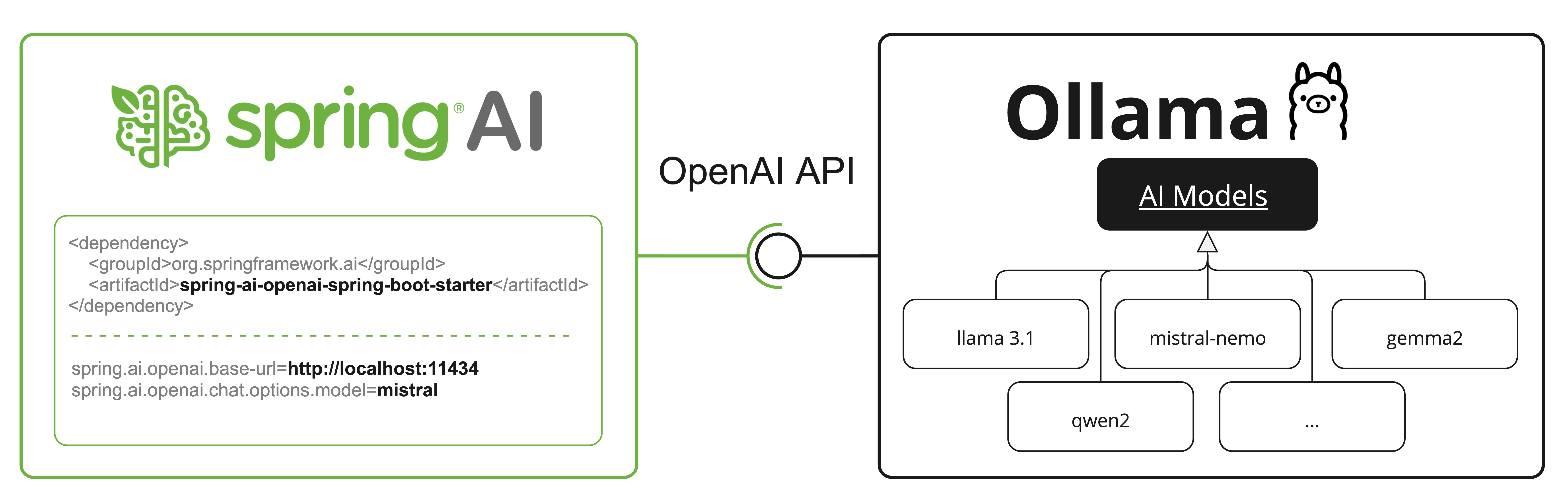
Ollama 是 OpenAI API 兼容的,您可以使用 Spring AI OpenAI 客户端与 Ollama 通信并使用工具。
为此,您需要将 OpenAI base URL 配置为您的 Ollama 实例:spring.ai.openai.chat.base-url=http://localhost:11434 并选择提供的 Ollama 模型之一:spring.ai.openai.chat.options.model=mistral。
提示: 使用 OpenAI 客户端与 Ollama 时,您可以使用 extraBody option 传递 Ollama 特定的参数(如
top_k、repeat_penalty、num_predict)。 这允许您在 using OpenAI 客户端时利用 Ollama 的完整功能。
Reasoning Content via OpenAI Compatibility
Ollama 的 OpenAI 兼容 endpoint 支持支持 thinking 的模型(如 qwen3:*-thinking、deepseek-r1、deepseek-v3.1)的 reasoning_content 字段。
使用 Spring AI OpenAI 客户端与 Ollama 时,模型的推理过程会自动捕获并通过响应 metadata 提供。
注意: 这是使用 Ollama 原生 thinking mode API(在上面 【Thinking Mode (Reasoning)】 中记录)的替代方案。 两种方法都适用于 Ollama 的 thinking 模型,但 OpenAI 兼容 endpoint 使用
reasoning_content字段名称而不是thinking。
以下是通过 OpenAI 客户端从 Ollama 访问推理内容的示例:
// Configure Spring AI OpenAI client to point to Ollama
@Configuration
class OllamaConfig {
    @Bean
    OpenAiChatModel ollamaChatModel() {
        var openAiApi = new OpenAiApi("http://localhost:11434", "ollama");
        return new OpenAiChatModel(openAiApi,
            OpenAiChatOptions.builder()
                .model("deepseek-r1")  // or qwen3, deepseek-v3.1, etc.
                .build());
    }
}

// Use the model with thinking-capable models
ChatResponse response = chatModel.call(
    new Prompt("How many letter 'r' are in the word 'strawberry'?"));

// Access the reasoning process from metadata
String reasoning = response.getResult().getMetadata().get("reasoningContent");
if (reasoning != null && !reasoning.isEmpty()) {
    System.out.println("Model's reasoning process:");
    System.out.println(reasoning);
}

// Get the final answer
String answer = response.getResult().getOutput().getContent();
System.out.println("Answer: " + answer);
提示: Ollama 中支持 thinking 的模型(0.12+)在通过 OpenAI 兼容 endpoint 访问时自动启用 thinking mode。 推理内容会自动捕获,无需额外配置。
请查看 OllamaWithOpenAiChatModelIT.java 测试,了解通过 Spring AI OpenAI 使用 Ollama 的示例。
HuggingFace Models
Ollama 可以开箱即用地访问所有 GGUF Hugging Face Chat Models。
您可以通过名称拉取这些模型中的任何一个:ollama pull hf.co/<username>/<model-repository> 或配置自动拉取策略:Auto-pulling Models:
spring.ai.ollama.chat.options.model=hf.co/bartowski/gemma-2-2b-it-GGUF
spring.ai.ollama.init.pull-model-strategy=always
spring.ai.ollama.chat.options.model: 指定要使用的 Hugging Face GGUF model。spring.ai.ollama.init.pull-model-strategy=always: (可选)在启动时启用自动模型拉取。
对于生产,您应该预下载模型以避免延迟:
ollama pull hf.co/bartowski/gemma-2-2b-it-GGUF。
Sample Controller
Create 一个新的 Spring Boot 项目,并将 spring-ai-starter-model-ollama 添加到您的 pom(或 gradle)依赖项中。
在 src/main/resources 目录下添加一个 application.yaml 文件,以启用和配置 Ollama chat model:
spring:
  ai:
    ollama:
      base-url: http://localhost:11434
      chat:
        options:
          model: mistral
          temperature: 0.7
提示: 将
base-url替换为您的 Ollama 服务器 URL。
这将创建一个 OllamaChatModel 实现,您可以将其注入到您的类中。
以下是一个简单的 @RestController 类的示例,它使用 chat model 进行文本生成。
@RestController
public class ChatController {

    private final OllamaChatModel chatModel;

    @Autowired
    public ChatController(OllamaChatModel chatModel) {
        this.chatModel = chatModel;
    }

    @GetMapping("/ai/generate")
    public Map<String,String> generate(@RequestParam(value = "message", defaultValue = "Tell me a joke") String message) {
        return Map.of("generation", this.chatModel.call(message));
    }

    @GetMapping("/ai/generateStream")
	public Flux<ChatResponse> generateStream(@RequestParam(value = "message", defaultValue = "Tell me a joke") String message) {
        Prompt prompt = new Prompt(new UserMessage(message));
        return this.chatModel.stream(prompt);
    }

}
Manual Configuration
如果您不想使用 Spring Boot auto-configuration,可以在应用程序中手动配置 OllamaChatModel。
OllamaChatModel 实现了 ChatModel 和 StreamingChatModel,并使用 【low-level-api】 连接到 Ollama 服务。
要使用它,请将 spring-ai-ollama 依赖项添加到项目的 Maven pom.xml 或 Gradle build.gradle 构建文件中:
<dependency>
    <groupId>org.springframework.ai</groupId>
    <artifactId>spring-ai-ollama</artifactId>
</dependency>
提示: 请参阅 Dependency Management 部分,将 Spring AI BOM 添加到您的构建文件中。
提示:
spring-ai-ollama依赖项还提供对OllamaEmbeddingModel的访问。 有关OllamaEmbeddingModel的更多信息,请参阅 Ollama Embedding Model 部分。
接下来,创建一个 OllamaChatModel 实例并使用它发送文本生成请求:
var ollamaApi = OllamaApi.builder().build();

var chatModel = OllamaChatModel.builder()
                    .ollamaApi(ollamaApi)
                    .defaultOptions(
                        OllamaChatOptions.builder()
                            .model(OllamaModel.MISTRAL)
                            .temperature(0.9)
                            .build())
                    .build();

ChatResponse response = this.chatModel.call(
    new Prompt("Generate the names of 5 famous pirates."));

// Or with streaming responses
Flux<ChatResponse> response = this.chatModel.stream(
    new Prompt("Generate the names of 5 famous pirates."));
OllamaChatOptions 提供所有 chat 请求的配置信息。
Low-level OllamaApi Client [[low-level-api]]
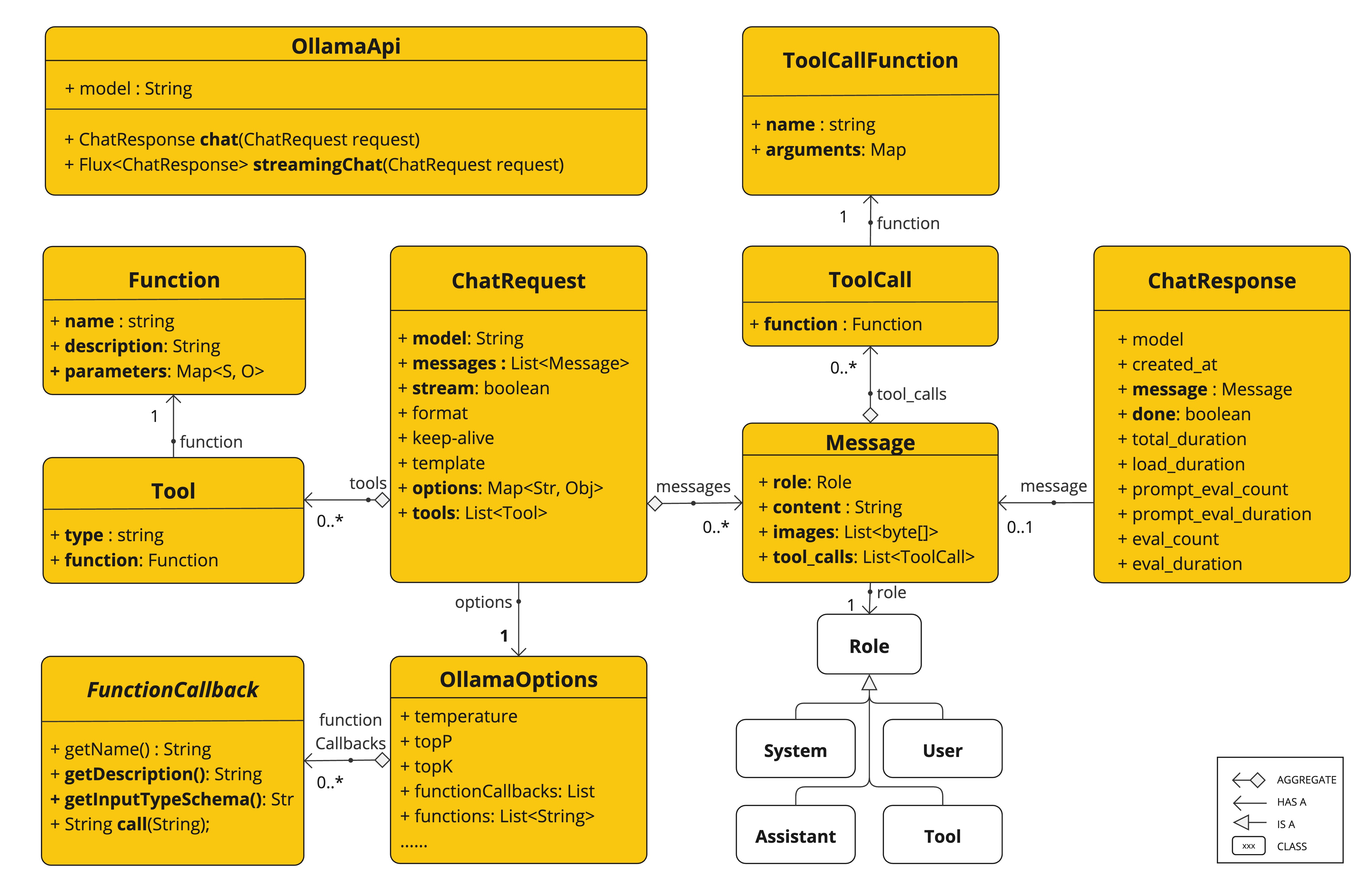
OllamaApi 为 Ollama Chat Completion API 提供轻量级 Java 客户端。
以下类图说明了 OllamaApi chat 接口和构建块:
注意:
OllamaApi是一个 low-level API,不建议直接使用。请改用OllamaChatModel。
以下是如何以编程方式使用 API 的简单示例:
OllamaApi ollamaApi = new OllamaApi("YOUR_HOST:YOUR_PORT");

// Sync request
var request = ChatRequest.builder("orca-mini")
    .stream(false) // not streaming
    .messages(List.of(
            Message.builder(Role.SYSTEM)
                .content("You are a geography teacher. You are talking to a student.")
                .build(),
            Message.builder(Role.USER)
                .content("What is the capital of Bulgaria and what is the size? "
                        + "What is the national anthem?")
                .build()))
    .options(OllamaChatOptions.builder().temperature(0.9).build())
    .build();

ChatResponse response = this.ollamaApi.chat(this.request);

// Streaming request
var request2 = ChatRequest.builder("orca-mini")
    .ttream(true) // streaming
    .messages(List.of(Message.builder(Role.USER)
        .content("What is the capital of Bulgaria and what is the size? " + "What is the national anthem?")
        .build()))
    .options(OllamaChatOptions.builder().temperature(0.9).build().toMap())
    .build();

Flux<ChatResponse> streamingResponse = this.ollamaApi.streamingChat(this.request2);