Tools
许多 AI 应用程序通过自然语言与用户交互。然而,某些业务场景需要模型使用结构化输入直接与外部系统(如 API、数据库或文件系统)进行交互。
Tools 是 agents 调用来执行操作的组件。它们通过定义良好的输入和输出让模型与外部世界交互,从而扩展模型的能力。Tools 封装了一个可调用的函数及其输入模式。我们可以把工具定义传递给兼容的 models,允许模型决定是否调用工具以及使用什么参数。在这些场景中,工具调用使模型能够生成符合指定输入模式的请求。
注意:服务器端工具使用
某些聊天模型(例如 OpenAI、Anthropic 和 Gemini)具有在服务器端执行的内置工具,如 Web 搜索和代码解释器。请参阅提供商概述以了解如何使用特定聊天模型访问这些工具。
TIP: 迁移与更多 Tool Calling 说明请参考:Tool Calling 使用指南。
Tool calling(也称为 function calling)是 AI 应用程序中的常见模式,允许 model 与一组 API 或 tools 交互,增强其能力。
Tools 主要用于:
- 信息检索。此类别中的 tools 可用于从外部源检索信息,例如数据库、Web 服务、文件系统或 Web 搜索引擎。目标是增强 model 的知识,使其能够回答原本无法回答的问题。因此,它们可以在 Retrieval Augmented Generation (RAG) 场景中使用。例如,可以使用 tool 检索给定位置的当前天气、检索最新新闻文章或查询数据库中的特定记录。
- 执行操作。此类别中的 tools 可用于在软件系统中执行操作,例如发送电子邮件、在数据库中创建新记录、提交表单或触发工作流。目标是自动化原本需要人工干预或显式编程的任务。例如,可以使用 tool 为与聊天机器人交互的客户预订航班、填写网页上的表单,或在代码生成场景中基于自动化测试(TDD)实现 Java 类。
尽管我们通常将 tool calling 称为 model 能力,但实际上由客户端应用程序提供 tool calling 逻辑。Model 只能请求 tool call 并提供输入参数,而应用程序负责从输入参数执行 tool call 并返回结果。Model 永远无法访问作为 tools 提供的任何 API,这是一个关键的安全考虑。
Spring AI 提供了便捷的 API 来定义 tools、解析来自 model 的 tool call 请求并执行 tool calls。
快速开始
让我们看看如何在 Spring AI 中开始使用 tool calling。我们将实现两个简单的 tools:一个用于信息检索,一个用于执行操作。
信息检索
AI model 无法访问实时信息。任何假设了解当前日期或天气预报等信息的问题都无法由 model 回答。但是,我们可以提供一个可以检索此信息的 tool,并让 model 在需要访问实时信息时调用此 tool。
让我们在 DateTimeTools 类中实现一个 tool 来获取用户时区的当前日期和时间。该 tool 不接受任何参数。来自 Spring Framework 的 LocaleContextHolder 可以提供用户的时区。该 tool 将定义为用 @Tool 注解的方法。为了帮助 model 理解是否以及何时调用此 tool,我们将提供该 tool 功能的详细描述。
import java.time.LocalDateTime;
import org.springframework.ai.tool.annotation.Tool;
import org.springframework.context.i18n.LocaleContextHolder;

class DateTimeTools {

  @Tool(description = "Get the current date and time in the user's timezone")
  String getCurrentDateTime() {
      return LocalDateTime.now().atZone(LocaleContextHolder.getTimeZone().toZoneId()).toString();
  }

}
接下来,让我们使 tool 可用于 model。在此示例中,我们将使用 ChatClient 与 model 交互。我们将通过 tools() 方法传递 DateTimeTools 的实例来向 model 提供 tool。当 model 需要知道当前日期和时间时,它将请求调用 tool。在内部,ChatClient 将调用 tool 并将结果返回给 model,然后 model 将使用 tool call 结果生成对原始问题的最终响应。
ChatModel chatModel = ...;

String response = ChatClient.create(chatModel)
      .prompt("What day is tomorrow?")
      .tools(new DateTimeTools())
      .call()
      .content();

System.out.println(response);
// 输出:Tomorrow is 2015-10-21.
执行操作
AI model 可用于生成完成某些目标的计划。例如,model 可以生成预订前往丹麦旅行的计划。但是,model 无法执行计划。这就是 tools 的用武之地:它们可用于执行 model 生成的计划。
在前面的示例中,我们使用 tool 来确定当前日期和时间。在此示例中,我们将定义一个用于在特定时间设置闹钟的第二个 tool。目标是从现在起 10 分钟设置闹钟,因此我们需要向 model 提供两个 tools 来完成此任务。
我们将新 tool 添加到与之前相同的 DateTimeTools 类中。新 tool 将接受单个参数,即 ISO-8601 格式的时间。然后,tool 将向控制台打印一条消息,指示已为给定时间设置闹钟。与之前一样,tool 定义为用 @Tool 注解的方法,我们还使用它提供详细描述以帮助 model 理解何时以及如何使用 tool。
import java.time.LocalDateTime;
import java.time.format.DateTimeFormatter;
import org.springframework.ai.tool.annotation.Tool;
import org.springframework.context.i18n.LocaleContextHolder;

class DateTimeTools {

  @Tool(description = "Get the current date and time in the user's timezone")
  String getCurrentDateTime() {
      return LocalDateTime.now().atZone(LocaleContextHolder.getTimeZone().toZoneId()).toString();
  }

  @Tool(description = "Set a user alarm for the given time, provided in ISO-8601 format")
  void setAlarm(String time) {
      LocalDateTime alarmTime = LocalDateTime.parse(time, DateTimeFormatter.ISO_DATE_TIME);
      System.out.println("Alarm set for " + alarmTime);
  }

}
接下来,让我们使两个 tools 都可用于 model。当我们要求从现在起 10 分钟设置闹钟时,model 首先需要知道当前日期和时间。然后,它将使用当前日期和时间来计算闹钟时间。最后,它将使用闹钟 tool 来设置闹钟。
ChatModel chatModel = ...;

String response = ChatClient.create(chatModel)
      .prompt("Can you set an alarm 10 minutes from now?")
      .tools(new DateTimeTools())
      .call()
      .content();

System.out.println(response);
// 在应用程序日志中,您可以检查闹钟是否已在正确时间设置。
概述
Spring AI 通过一组灵活的抽象支持 tool calling,允许您以一致的方式定义、解析和执行 tools。本节概述了 Spring AI 中 tool calling 的主要概念和组件。
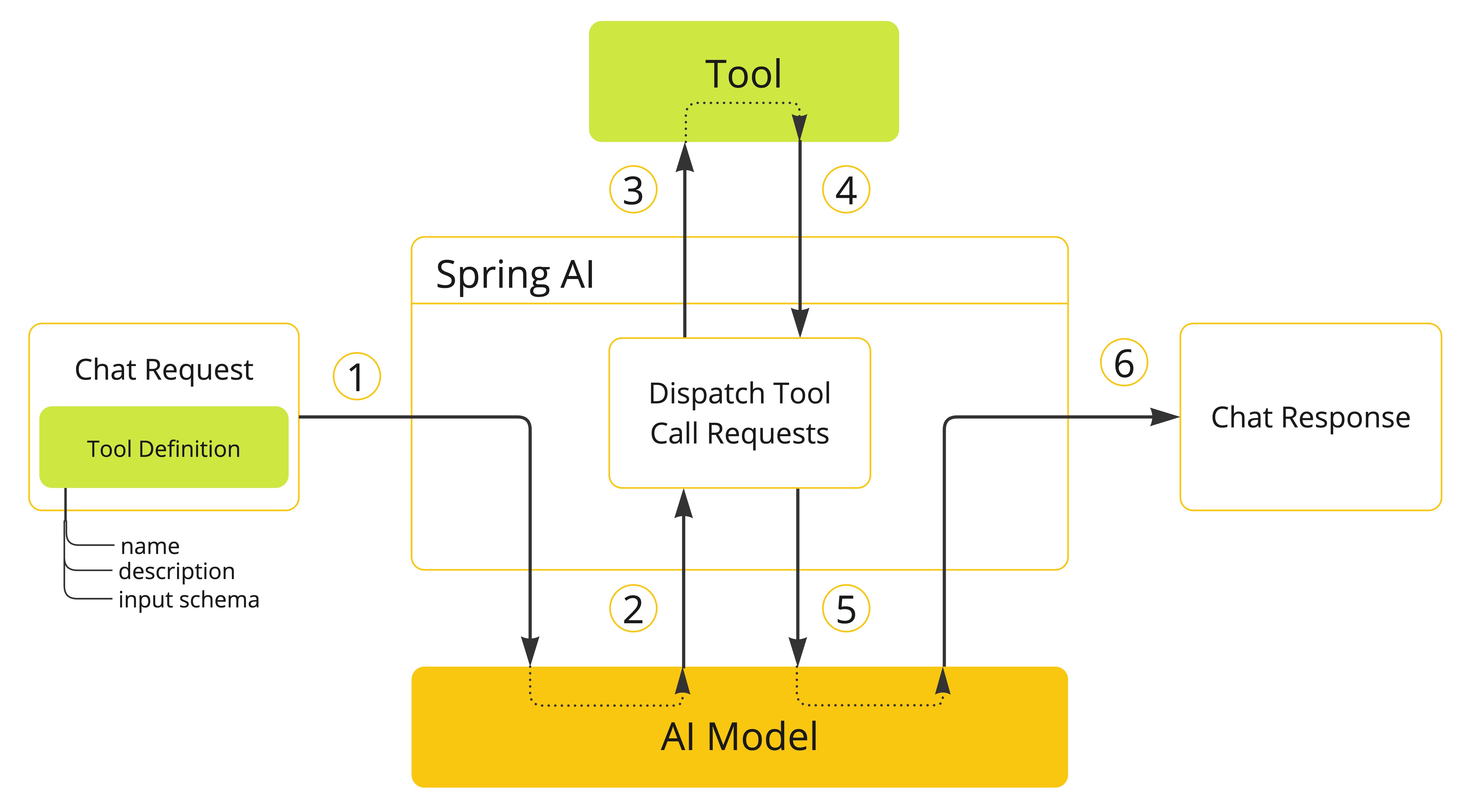
- 当我们想要使 tool 可用于 model 时,我们在聊天请求中包含其定义。每个 tool 定义包括名称、描述和输入参数的 schema。
- 当 model 决定调用 tool 时,它发送带有 tool 名称和根据定义 schema 建模的输入参数的响应。
- 应用程序负责使用 tool 名称来识别并使用提供的输入参数执行 tool。
- Tool call 的结果由应用程序处理。
- 应用程序将 tool call 结果发送回 model。
- Model 使用 tool call 结果作为附加上下文生成最终响应。
Tools 是 tool calling 的构建块,它们由 ToolCallback 接口建模。Spring AI 提供了从方法和函数指定 ToolCallback(s) 的内置支持,但您始终可以定义自己的 ToolCallback 实现以支持更多用例。
ChatModel 实现透明地将 tool call 请求分派到相应的 ToolCallback 实现,并将 tool call 结果发送回 model,最终生成最终响应。它们使用 ToolCallingManager 接口来执行此操作,该接口负责管理 tool 执行生命周期。
ChatClient 和 ChatModel 都接受 ToolCallback 对象列表,以使 tools 可用于 model 和最终执行它们的 ToolCallingManager。
除了直接传递 ToolCallback 对象外,您还可以传递 tool 名称列表,这些名称将使用 ToolCallbackResolver 接口动态解析。
创建工具
Spring AI 提供了两种从方法指定 tools(即 ToolCallback(s))的内置支持:
- 声明式,使用
@Tool注解 - 编程式,使用低级
MethodToolCallback实现。
方法作为 Tools
声明式规范:@Tool
您可以通过用 @Tool 注解方法来将方法转换为 tool。
class DateTimeTools {

  @Tool(description = "Get the current date and time in the user's timezone")
  String getCurrentDateTime() {
      return LocalDateTime.now().atZone(LocaleContextHolder.getTimeZone().toZoneId()).toString();
  }

}
@Tool 注解允许您提供有关 tool 的关键信息:
name:tool 的名称。如果未提供,将使用方法名称。AI model 使用此名称在调用时识别 tool。因此,不允许在同一类中有两个同名 tools。名称必须在特定聊天请求中提供给 model 的所有 tools 中唯一。description:tool 的描述,model 可以使用它来理解何时以及如何调用 tool。如果未提供,方法名称将用作 tool 描述。但是,强烈建议提供详细描述,因为这对于 model 理解 tool 的用途以及如何使用它至关重要。未能提供良好的描述可能导致 model 在应该使用时不使用 tool 或错误使用它。returnDirect:tool 结果是否应直接返回给客户端或传递回 model。有关更多详细信息,请参阅 返回直接。resultConverter:用于将 tool call 的结果转换为String object以发送回 AI model 的ToolCallResultConverter实现。有关更多详细信息,请参阅 结果转换。
方法可以是静态的或实例的,并且可以具有任何可见性(public、protected、package-private 或 private)。包含方法的类可以是顶级类或嵌套类,也可以具有任何可见性(只要在您计划实例化它的地方可以访问)。
NOTE: Spring AI 为
@Tool注解方法的 AOT 编译提供内置支持,只要包含方法的类是 Spring bean(例如@Component)。否则,您需要向 GraalVM 编译器提供必要的配置。例如,通过用@RegisterReflection(memberCategories = MemberCategory.INVOKE_DECLARED_METHODS)注解类。
您可以为方法定义任意数量的参数(包括无参数),支持大多数类型(基元、POJO、枚举、列表、数组、映射等)。同样,方法可以返回大多数类型,包括 void。如果方法返回值,返回类型必须是可序列化类型,因为结果将被序列化并发送回 model。
NOTE: 某些类型不受支持。有关更多详细信息,请参阅 方法 Tool 限制。
Spring AI 将自动为 @Tool 注解方法的输入参数生成 JSON schema。Schema 由 model 用于理解如何调用 tool 并准备 tool 请求。@ToolParam 注解可用于提供有关输入参数的附加信息,例如描述或参数是必需还是可选的。默认情况下,所有输入参数都被视为必需。
import java.time.LocalDateTime;
import java.time.format.DateTimeFormatter;
import org.springframework.ai.tool.annotation.Tool;
import org.springframework.ai.tool.annotation.ToolParam;

class DateTimeTools {

  @Tool(description = "Set a user alarm for the given time")
  void setAlarm(@ToolParam(description = "Time in ISO-8601 format") String time) {
      LocalDateTime alarmTime = LocalDateTime.parse(time, DateTimeFormatter.ISO_DATE_TIME);
      System.out.println("Alarm set for " + alarmTime);
  }

}
@ToolParam 注解允许您提供有关 tool 参数的关键信息:
description:参数的描述,model 可以使用它来更好地理解如何使用它。例如,参数应该是什么格式,允许什么值等。required:参数是必需还是可选的。默认情况下,所有参数都被视为必需。
如果参数用 @Nullable 注解,除非使用 @ToolParam 注解明确标记为必需,否则将被视为可选。
除了 @ToolParam 注解外,您还可以使用来自 Swagger 的 @Schema 注解或来自 Jackson 的 @JsonProperty。有关更多详细信息,请参阅 JSON Schema。
编程式规范:MethodToolCallback
您可以通过编程方式构建 MethodToolCallback 来将方法转换为 tool。
import org.springframework.util.ReflectionUtils;
import org.springframework.ai.tool.ToolCallback;
import org.springframework.ai.tool.method.MethodToolCallback;
import org.springframework.ai.tool.ToolDefinitions;

class DateTimeTools {

  String getCurrentDateTime() {
      return LocalDateTime.now().atZone(LocaleContextHolder.getTimeZone().toZoneId()).toString();
  }

}

Method method = ReflectionUtils.findMethod(DateTimeTools.class, "getCurrentDateTime");
ToolCallback toolCallback = MethodToolCallback.builder()
  .toolDefinition(ToolDefinitions.builder(method)
          .description("Get the current date and time in the user's timezone")
          .build())
  .toolMethod(method)
  .toolObject(new DateTimeTools())
  .build();
MethodToolCallback.Builder 允许您构建 MethodToolCallback 实例并提供有关 tool 的关键信息:
toolDefinition:定义 tool 名称、描述和输入 schema 的ToolDefinition实例。您可以使用ToolDefinition.Builder类构建它。必需。toolMetadata:定义附加设置的ToolMetadata实例,例如结果是否应直接返回给客户端,以及要使用的结果转换器。您可以使用ToolMetadata.Builder类构建它。toolMethod:表示 tool 方法的Method实例。必需。toolObject:包含 tool 方法的对象实例。如果方法是静态的,您可以省略此参数。toolCallResultConverter:用于将 tool call 的结果转换为String对象以发送回 AI model 的ToolCallResultConverter实例。如果未提供,将使用默认转换器(DefaultToolCallResultConverter)。
如果方法是静态的,您可以省略 toolObject() 方法,因为不需要它。
class DateTimeTools {

  static String getCurrentDateTime() {
      return LocalDateTime.now().atZone(LocaleContextHolder.getTimeZone().toZoneId()).toString();
  }

}

Method method = ReflectionUtils.findMethod(DateTimeTools.class, "getCurrentDateTime");
ToolCallback toolCallback = MethodToolCallback.builder()
  .toolDefinition(ToolDefinitions.builder(method)
          .description("Get the current date and time in the user's timezone")
          .build())
  .toolMethod(method)
  .build();
方法 Tool 限制
以下类型目前不支持作为用作 tools 的方法的参数或返回类型:
Optional- 异步类型(例如
CompletableFuture、Future) - 响应式类型(例如
Flow、Mono、Flux) - 函数类型(例如
Function、Supplier、Consumer)。
函数类型使用基于函数的 tool 规范方法支持。有关更多详细信息,请参阅 函数作为 Tools。
函数作为 Tools
基础工具定义
Spring AI 提供了对从函数指定工具的内置支持,可以通过编程方式使用低级 FunctionToolCallback 实现,也可以动态地作为在运行时解析的 @Bean。
编程方式规范:FunctionToolCallback
你可以通过编程方式构建 FunctionToolCallback,将函数类型(Function、Supplier、Consumer 或 BiFunction)转换为工具。
import java.util.function.Function;

public class WeatherService implements Function<WeatherRequest, WeatherResponse> {
  public WeatherResponse apply(WeatherRequest request) {
      return new WeatherResponse(30.0, Unit.C);
  }
}

public enum Unit { C, F }
public record WeatherRequest(String location, Unit unit) {}
public record WeatherResponse(double temp, Unit unit) {}
FunctionToolCallback.Builder 允许你构建 FunctionToolCallback 实例并提供有关工具的关键信息:
- name: 工具的名称。AI 模型使用此名称在调用时识别工具。因此,在同一上下文中不允许有两个同名的工具。对于特定的聊天请求,名称在模型可用的所有工具中必须是唯一的。必需。
- toolFunction: 表示工具方法的函数对象(
Function、Supplier、Consumer或BiFunction)。必需。 - description: 工具的描述,模型可以使用它来了解何时以及如何调用工具。如果未提供,将使用方法名称作为工具描述。但是,强烈建议提供详细描述,因为这对于模型理解工具的目的和使用方式至关重要。如果未提供良好的描述,可能导致模型在应该使用工具时不使用,或者使用不正确。
- inputType: 函数输入的类型。必需。
- inputSchema: 工具输入参数的 JSON schema。如果未提供,将根据
inputType自动生成 schema。你可以使用@ToolParam注解提供有关输入参数的附加信息,例如描述或参数是必需还是可选。默认情况下,所有输入参数都被视为必需。 - toolMetadata: 定义附加设置的
ToolMetadata实例,例如是否应将结果直接返回给客户端,以及要使用的结果转换器。你可以使用ToolMetadata.Builder类构建它。 - toolCallResultConverter: 用于将工具调用结果转换为字符串对象以发送回 AI 模型的
ToolCallResultConverter实例。如果未提供,将使用默认转换器(DefaultToolCallResultConverter)。
import org.springframework.ai.tool.ToolCallback;
import org.springframework.ai.tool.function.FunctionToolCallback;

ToolCallback toolCallback = FunctionToolCallback
  .builder("currentWeather", new WeatherService())
  .description("Get the weather in location")
  .inputType(WeatherRequest.class)
  .build();
函数的输入和输出可以是 Void 或 POJO。输入和输出 POJO 必须是可序列化的,因为结果将被序列化并发送回模型。函数以及输入和输出类型必须是公共的。
重要提示:某些类型不受支持。有关更多详细信息,请参阅函数工具限制。
添加工具到 ChatClient:
使用编程规范方法时,你可以将 FunctionToolCallback 实例传递给 ChatClient 的 toolCallbacks() 方法。该工具仅对添加到的特定聊天请求可用。
import org.springframework.ai.chat.client.ChatClient;

ToolCallback toolCallback = ...;

ChatClient.create(chatModel)
  .prompt("What's the weather like in Copenhagen?")
  .toolCallbacks(toolCallback)
  .call()
  .content();
添加默认工具到 ChatClient:
使用编程规范方法时,你可以通过将 FunctionToolCallback 实例传递给 defaultToolCallbacks() 方法将默认工具添加到 ChatClient.Builder。如果同时提供默认工具和运行时工具,运行时工具将完全覆盖默认工具。
ChatModel chatModel = ...;
ToolCallback toolCallback = ...;

ChatClient chatClient = ChatClient.builder(chatModel)
  .defaultToolCallbacks(toolCallback)
  .build();
注意:默认工具在从同一 ChatClient.Builder 构建的所有 ChatClient 实例执行的所有聊天请求中共享。它们对于跨不同聊天请求常用的工具很有用,但如果不小心使用也可能很危险,可能在不应该使用时使它们可用。
添加工具到 ChatModel:
使用编程规范方法时,你可以将 FunctionToolCallback 实例传递给 ToolCallingChatOptions 的 toolCallbacks() 方法。该工具仅对添加到的特定聊天请求可用。
import org.springframework.ai.chat.model.ChatModel;
import org.springframework.ai.chat.prompt.Prompt;
import org.springframework.ai.model.tool.ToolCallingChatOptions;

ChatModel chatModel = ...;
ToolCallback toolCallback = ...;

ChatOptions chatOptions = ToolCallingChatOptions.builder()
  .toolCallbacks(toolCallback)
  .build();

Prompt prompt = new Prompt("What's the weather like in Copenhagen?", chatOptions);
chatModel.call(prompt);
动态规范:@Bean
你可以将工具定义为 Spring beans,让 Spring AI 使用 ToolCallbackResolver 接口(通过 SpringBeanToolCallbackResolver 实现)在运行时动态解析它们,而不是以编程方式指定工具。此选项使你可以将任何 Function、Supplier、Consumer 或 BiFunction bean 用作工具。bean 名称将用作工具名称,Spring Framework 的 @Description 注解可用于为工具提供描述,供模型用来了解何时以及如何调用工具。
import org.springframework.context.annotation.Bean;
import org.springframework.context.annotation.Configuration;
import org.springframework.context.annotation.Description;
import java.util.function.Function;

@Configuration(proxyBeanMethods = false)
class WeatherTools {

  WeatherService weatherService = new WeatherService();

  @Bean
  @Description("Get the weather in location")
  Function<WeatherRequest, WeatherResponse> currentWeather() {
      return weatherService;
  }
}
重要提示:某些类型不受支持。有关更多详细信息,请参阅函数工具限制。
工具输入参数的 JSON schema 将自动生成。你可以使用 @ToolParam 注解提供有关输入参数的附加信息,例如描述或参数是必需还是可选。默认情况下,所有输入参数都被视为必需。
import org.springframework.ai.tool.annotation.ToolParam;

record WeatherRequest(
  @ToolParam(description = "The name of a city or a country") String location,
  Unit unit
) {}
此工具规范方法的缺点是不保证类型安全,因为工具解析是在运行时完成的。为了缓解这一问题,你可以使用 @Bean 注解显式指定工具名称并将值存储在常量中,以便你可以在聊天请求中使用它而不是硬编码工具名称。
@Configuration(proxyBeanMethods = false)
class WeatherTools {

  public static final String CURRENT_WEATHER_TOOL = "currentWeather";

  @Bean(CURRENT_WEATHER_TOOL)
  @Description("Get the weather in location")
  Function<WeatherRequest, WeatherResponse> currentWeather() {
      // ...
  }
}
添加工具到 ChatClient(使用动态规范):
ChatClient.create(chatModel)
  .prompt("What's the weather like in Copenhagen?")
  .toolNames("currentWeather")
  .call()
  .content();
添加默认工具到 ChatClient(使用动态规范):
ChatModel chatModel = ...;

ChatClient chatClient = ChatClient.builder(chatModel)
  .defaultToolNames("currentWeather")
  .build();
函数工具限制
以下类型目前不支持作为用作工具的函数的输入或输出类型:
- 原始类型
Optional- 集合类型(例如
List、Map、Array、Set) - 异步类型(例如
CompletableFuture、Future) - 响应式类型(例如
Flow、Mono、Flux)
使用基于方法的工具规范方法支持原始类型和集合。
Tool 规范
在 Spring AI 中,tools 通过 ToolCallback 接口建模。在前面的部分中,我们已经看到了如何使用 Spring AI 提供的内置支持从方法和函数定义 tools。本节将更深入地介绍 tool 规范以及如何自定义和扩展它以支持更多用例。
Tool Callback
ToolCallback 接口提供了一种定义可由 AI model 调用的 tool 的方法,包括定义和执行逻辑。当您想从头开始定义 tool 时,这是要实现的主要接口。
接口提供以下方法:
public interface ToolCallback {

  /**
   * Definition used by the AI model to determine when and how to call the tool.
   */
  ToolDefinition getToolDefinition();

  /**
   * Metadata providing additional information on how to handle the tool.
   */
  ToolMetadata getToolMetadata();

  /**
   * Execute tool with the given input and return the result to send back to the AI model.
   */
  String call(String toolInput);

  /**
   * Execute tool with the given input and context, and return the result to send back to the AI model.
   */
  String call(String toolInput, ToolContext toolContext);

}
Spring AI 为 tool 方法(MethodToolCallback)和 tool 函数(FunctionToolCallback)提供内置实现。
Tool Definition
ToolDefinition 接口提供 AI model 了解 tool 可用性所需的信息,包括 tool 名称、描述和输入 schema。每个 ToolCallback 实现必须提供 ToolDefinition 实例来定义 tool。
接口提供以下方法:
public interface ToolDefinition {

  /**
   * The tool name. Unique within the tool set provided to a model.
   */
  String name();

  /**
   * The tool description, used by the AI model to determine what the tool does.
   */
  String description();

  /**
   * The schema of the parameters used to call the tool.
   */
  String inputSchema();

}
ToolDefinition.Builder 允许您使用默认实现(DefaultToolDefinition)构建 ToolDefinition 实例。
ToolDefinition toolDefinition = ToolDefinition.builder()
  .name("currentWeather")
  .description("Get the weather in location")
  .inputSchema("""
      {
          "type": "object",
          "properties": {
              "location": {
                  "type": "string"
              },
              "unit": {
                  "type": "string",
                  "enum": ["C", "F"]
              }
          },
          "required": ["location", "unit"]
      }
  """)
  .build();
JSON Schema
向 AI model 提供 tool 时,model 需要知道调用 tool 的输入类型的 schema。Schema 用于理解如何调用 tool 并准备 tool 请求。Spring AI 通过 JsonSchemaGenerator 类为生成 tool 输入类型的 JSON Schema 提供内置支持。Schema 作为 ToolDefinition 的一部分提供。
JsonSchemaGenerator 类在底层用于为方法或函数的输入参数生成 JSON schema。JSON schema 生成逻辑支持一系列注解,您可以在方法和函数的输入参数上使用这些注解来自定义生成的 schema。
本节描述在生成 tool 输入参数的 JSON schema 时可以自定义的两个主要选项:描述和必需状态。
描述
除了为 tool 本身提供描述外,您还可以为 tool 的输入参数提供描述。描述可用于提供有关输入参数的关键信息,例如参数应该是什么格式、允许什么值等。这对于帮助 model 理解输入 schema 以及如何使用它很有用。Spring AI 使用以下注解之一为输入参数生成描述提供内置支持:
- Spring AI 的
@ToolParam(description = "...") - Jackson 的
@JsonClassDescription(description = "...") - Jackson 的
@JsonPropertyDescription(description = "...") - Swagger 的
@Schema(description = "...")
此方法适用于方法和函数,并且可以递归地用于嵌套类型。
必需/可选
默认情况下,每个输入参数都被视为必需,这强制 AI model 在调用 tool 时为其提供值。但是,您可以使用以下注解之一使输入参数可选,按此优先级顺序:
- Spring AI 的
@ToolParam(required = false) - Jackson 的
@JsonProperty(required = false) - Swagger 的
@Schema(required = false) - Spring Framework 的
@Nullable
此方法适用于方法和函数,并且可以递归地用于嵌套类型。
class CustomerTools {

  @Tool(description = "Update customer information")
  void updateCustomerInfo(Long id, String name, @ToolParam(required = false) String email) {
      System.out.println("Updated info for customer with id: " + id);
  }

}
WARNING: 为输入参数定义正确的必需状态对于减轻幻觉风险并确保 model 在调用 tool 时提供正确的输入至关重要。在前面的示例中,
结果转换
Tool call 的结果使用 ToolCallResultConverter 序列化,然后发送回 AI model。ToolCallResultConverter 接口提供了一种将 tool call 的结果转换为 String 对象的方法。
@FunctionalInterface
public interface ToolCallResultConverter {

  /**
   * Given an Object returned by a tool, convert it to a String compatible with the
   * given class type.
   */
  String convert(@Nullable Object result, @Nullable Type returnType);

}
结果必须是可序列化类型。默认情况下,结果使用 Jackson(DefaultToolCallResultConverter)序列化为 JSON,但您可以通过提供自己的 ToolCallResultConverter 实现来自定义序列化过程。
Spring AI 在方法和函数 tools 中都依赖 ToolCallResultConverter。
方法 Tool Call 结果转换
使用声明式方法从方法构建 tools 时,您可以通过设置 @Tool 注解的 resultConverter() 属性来为 tool 提供自定义 ToolCallResultConverter。
class CustomerTools {

  @Tool(description = "Retrieve customer information", resultConverter = CustomToolCallResultConverter.class)
  Customer getCustomerInfo(Long id) {
      return customerRepository.findById(id);
  }

}
如果使用编程式方法,您可以通过设置 MethodToolCallback.Builder 的 resultConverter() 属性来为 tool 提供自定义 ToolCallResultConverter。
函数 Tool Call 结果转换
使用编程式方法从函数构建 tools 时,您可以通过设置 FunctionToolCallback.Builder 的 resultConverter() 属性来为 tool 提供自定义 ToolCallResultConverter。
返回直接
默认情况下,tool call 的结果作为响应发送回 model。然后,model 可以使用结果继续对话。
在某些情况下,您可能希望将结果直接返回给调用者,而不是将其发送回 model。例如,如果您构建一个依赖 RAG tool 的 agent,您可能希望将结果直接返回给调用者,而不是将其发送回 model 进行不必要的后处理。或者,您可能有某些 tools 应该结束 agent 的推理循环。
每个 ToolCallback 实现可以定义 tool call 的结果是否应直接返回给调用者或发送回 model。默认情况下,结果发送回 model。但您可以按 tool 更改此行为。
负责管理 tool 执行生命周期的 ToolCallingManager 负责处理与 tool 关联的 returnDirect 属性。如果属性设置为 true,tool call 的结果将直接返回给调用者。否则,结果将发送回 model。
NOTE: 如果同时请求多个 tool calls,所有 tools 的
returnDirect属性必须设置为true才能将结果直接返回给调用者。否则,结果将发送回 model。
方法返回直接
使用声明式方法从方法构建 tools 时,您可以通过将 @Tool 注解的 returnDirect 属性设置为 true 来标记 tool 将结果直接返回给调用者。
class CustomerTools {

  @Tool(description = "Retrieve customer information", returnDirect = true)
  Customer getCustomerInfo(Long id) {
      return customerRepository.findById(id);
  }

}
如果使用编程式方法,您可以通过 ToolMetadata 接口设置 returnDirect 属性,并将其传递给 MethodToolCallback.Builder。
ToolMetadata toolMetadata = ToolMetadata.builder()
  .returnDirect(true)
  .build();
函数返回直接
使用编程式方法从函数构建 tools 时,您可以通过 ToolMetadata 接口设置 returnDirect 属性,并将其传递给 FunctionToolCallback.Builder。
Tool 执行
Tool 执行是使用提供的输入参数调用 tool 并返回结果的过程。Tool 执行由 ToolCallingManager 接口处理,该接口负责管理 tool 执行生命周期。
public interface ToolCallingManager {

  /**
   * Resolve the tool definitions from the model's tool calling options.
   */
  List<ToolDefinition> resolveToolDefinitions(ToolCallingChatOptions chatOptions);

  /**
   * Execute the tool calls requested by the model.
   */
  ToolExecutionResult executeToolCalls(Prompt prompt, ChatResponse chatResponse);

}
如果您使用任何 Spring AI Spring Boot Starters,DefaultToolCallingManager 是 ToolCallingManager 接口的自动配置实现。您可以通过提供自己的 ToolCallingManager bean 来自定义 tool 执行行为。
@Bean
ToolCallingManager toolCallingManager() {
  return ToolCallingManager.builder().build();
}
默认情况下,Spring AI 在每个 ChatModel 实现内部透明地为您管理 tool 执行生命周期。但您可以选择退出此行为并自己控制 tool 执行。本节描述这两种场景。
框架控制的 Tool 执行
使用默认行为时,Spring AI 将自动拦截来自 model 的任何 tool call 请求,调用 tool 并将结果返回给 model。所有这些都由每个使用 ToolCallingManager 的 ChatModel 实现透明地为您完成。
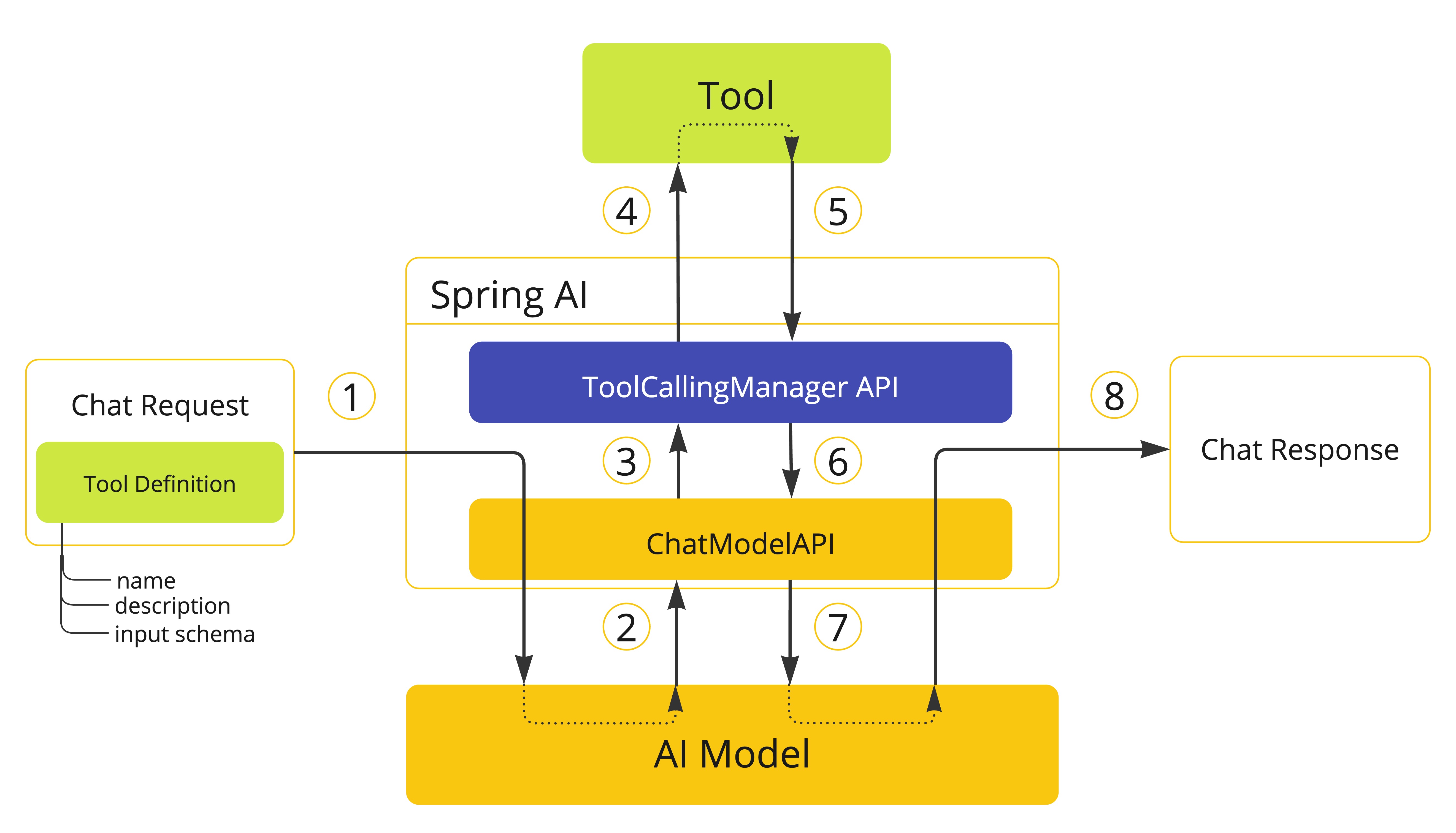
- 当我们想要使 tool 可用于 model 时,我们在聊天请求(
Prompt)中包含其定义,并调用将请求发送到 AI model 的ChatModelAPI。 - 当 model 决定调用 tool 时,它发送带有 tool 名称和根据定义 schema 建模的输入参数的响应(
ChatResponse)。 ChatModel将 tool call 请求发送到ToolCallingManagerAPI。ToolCallingManager负责识别要调用的 tool 并使用提供的输入参数执行它。- Tool call 的结果返回到
ToolCallingManager。 ToolCallingManager将 tool 执行结果返回给ChatModel。ChatModel将 tool 执行结果发送回 AI model(ToolResponseMessage)。- AI model 使用 tool call 结果作为附加上下文生成最终响应,并通过
ChatClient将其发送回调用者(ChatResponse)。
WARNING: 目前,与 model 交换的关于 tool 执行的内部消息不会暴露给用户。如果您需要访问这些消息,应该使用用户控制的 tool 执行方法。
确定 tool call 是否有资格执行的逻辑由 ToolExecutionEligibilityPredicate 接口处理。默认情况下,tool 执行资格通过检查 ToolCallingChatOptions 的 internalToolExecutionEnabled 属性是否设置为 true(默认值),以及 ChatResponse 是否包含任何 tool calls 来确定。
您可以在创建 ChatModel bean 时提供 ToolExecutionEligibilityPredicate 的自定义实现。
用户控制的 Tool 执行
在某些情况下,您可能希望自己控制 tool 执行生命周期。您可以通过将 ToolCallingChatOptions 的 internalToolExecutionEnabled 属性设置为 false 来执行此操作。
当您使用此选项调用 ChatModel 时,tool 执行将委托给调用者,让您完全控制 tool 执行生命周期。您有责任检查 ChatResponse 中的 tool calls 并使用 ToolCallingManager 执行它们。
以下示例演示了用户控制的 tool 执行方法的最小实现:
ChatModel chatModel = ...;
ToolCallingManager toolCallingManager = ToolCallingManager.builder().build();

ChatOptions chatOptions = ToolCallingChatOptions.builder()
  .toolCallbacks(new CustomerTools())
  .internalToolExecutionEnabled(false)
  .build();
Prompt prompt = new Prompt("Tell me more about the customer with ID 42", chatOptions);

ChatResponse chatResponse = chatModel.call(prompt);

while (chatResponse.hasToolCalls()) {
  ToolExecutionResult toolExecutionResult = toolCallingManager.executeToolCalls(prompt, chatResponse);

  prompt = new Prompt(toolExecutionResult.conversationHistory(), chatOptions);

  chatResponse = chatModel.call(prompt);
}

System.out.println(chatResponse.getResult().getOutput().getText());
NOTE: 选择用户控制的 tool 执行方法时,我们建议使用
ToolCallingManager来管理 tool calling 操作。这样,您可以受益于 Spring AI 为 tool 执行提供的内置支持。但是,没有什么可以阻止您实现自己的 tool 执行逻辑。
异常处理
当 tool call 失败时,异常作为 ToolExecutionException 传播,可以捕获以处理错误。ToolExecutionExceptionProcessor 可用于处理 ToolExecutionException,有两种结果:要么生成要发送回 AI model 的错误消息,要么抛出异常供调用者处理。
@FunctionalInterface
public interface ToolExecutionExceptionProcessor {

  /**
   * Convert an exception thrown by a tool to a String that can be sent back to the AI
   * model or throw an exception to be handled by the caller.
   */
  String process(ToolExecutionException exception);

}
如果您使用任何 Spring AI Spring Boot Starters,DefaultToolExecutionExceptionProcessor 是 ToolExecutionExceptionProcessor 接口的自动配置实现。默认情况下,RuntimeException 的错误消息会发送回 model,而检查异常和错误(例如,IOException、OutOfMemoryError)总是被抛出。DefaultToolExecutionExceptionProcessor 构造函数允许您将 alwaysThrow 属性设置为 true 或 false。如果为 true,将抛出异常而不是将错误消息发送回 model。
您可以使用 spring.ai.tools.throw-exception-on-error 属性来控制 DefaultToolExecutionExceptionProcessor bean 的行为:
| 属性 | 描述 | 默认值 |
|---|---|---|
spring.ai.tools.throw-exception-on-error | 如果为 true,tool calling 错误将作为异常抛出供调用者处理。如果为 false,错误将转换为消息并发送回 AI model,允许它处理并响应错误。 | false |
@Bean
ToolExecutionExceptionProcessor toolExecutionExceptionProcessor() {
  return new DefaultToolExecutionExceptionProcessor(true);
}
NOTE: 如果您定义了自己的
ToolCallback实现,请确保在call()方法中作为 tool 执行逻辑的一部分发生错误时抛出ToolExecutionException。
ToolExecutionExceptionProcessor 由默认 ToolCallingManager(DefaultToolCallingManager)内部使用,以处理 tool 执行期间的异常。
Tool 解析
向 model 传递 tools 的主要方法是在调用 ChatClient 或 ChatModel 时提供 ToolCallback(s),使用前面描述的策略之一。
但是,Spring AI 还支持使用 ToolCallbackResolver 接口在运行时动态解析 tools。
public interface ToolCallbackResolver {

  /**
   * Resolve the {@link ToolCallback} for the given tool name.
   */
  @Nullable
  ToolCallback resolve(String toolName);

}
使用此方法时:
- 在客户端,您向
ChatClient或ChatModel提供 tool 名称,而不是ToolCallback(s)。 - 在服务器端,
ToolCallbackResolver实现负责将 tool 名称解析为相应的ToolCallback实例。
默认情况下,Spring AI 依赖于 DelegatingToolCallbackResolver,它将 tool 解析委托给 ToolCallbackResolver 实例列表:
SpringBeanToolCallbackResolver从类型为Function、Supplier、Consumer或BiFunction的 Spring bean 解析 tools。StaticToolCallbackResolver从ToolCallback实例的静态列表解析 tools。使用 Spring Boot 自动配置时,此解析器会自动配置应用程序上下文中定义的所有类型为ToolCallback的 bean。
如果您依赖 Spring Boot 自动配置,可以通过提供自定义 ToolCallbackResolver bean 来自定义解析逻辑。
@Bean
ToolCallbackResolver toolCallbackResolver(List<ToolCallback> toolCallbacks) {
  StaticToolCallbackResolver staticToolCallbackResolver = new StaticToolCallbackResolver(toolCallbacks);
  return new DelegatingToolCallbackResolver(List.of(staticToolCallbackResolver));
}
ToolCallbackResolver 由 ToolCallingManager 内部使用,以在运行时动态解析 tools,支持框架控制的 Tool 执行和用户控制的 Tool 执行。
可观测性
Tool calling 包括可观测性支持,使用 spring.ai.tool 观察来测量完成时间并传播跟踪信息。请参阅 Tool Calling 可观测性。
可选地,Spring AI 可以将 tool call 参数和结果导出为 span 属性,默认情况下出于敏感性原因禁用。详细信息:Tool Call 参数和结果数据。
日志记录
Tool calling 功能的所有主要操作都在 DEBUG 级别记录。您可以通过将 org.springframework.ai 包的日志级别设置为 DEBUG 来启用日志记录。
自定义工具属性
自定义工具名称
默认情况下,工具名称来自函数名称。当你需要更具描述性的内容时,可以覆盖它:
ToolCallback searchTool = FunctionToolCallback
  .builder("web_search", new SearchFunction())  // 自定义名称
  .description("Search the web for information")
  .inputType(String.class)
  .build();

System.out.println(searchTool.getName());  // web_search
// 推荐:使用 ToolDefinition 提取名称
System.out.println(searchTool.getToolDefinition().name());  // web_search
自定义工具描述
覆盖自动生成的工具描述以提供更清晰的模型指导:
ToolCallback calculatorTool = FunctionToolCallback
  .builder("calculator", new CalculatorFunction())
  .description("Performs arithmetic calculations. Use this for any math problems.")
  .inputType(String.class)
  .build();
高级模式定义
使用 Java 类或 JSON schemas 定义复杂的输入:
使用 Java 记录类(Record):
import org.springframework.ai.tool.annotation.ToolParam;

public record WeatherInput(
  @ToolParam(description = "City name or coordinates") String location,
  @ToolParam(description = "Temperature unit preference") Unit units,
  @ToolParam(description = "Include 5-day forecast") boolean includeForecast
) {}

public enum Unit { CELSIUS, FAHRENHEIT }

public class WeatherFunction implements Function<WeatherInput, String> {
  @Override
  public String apply(WeatherInput input) {
      double temp = input.units() == Unit.CELSIUS ? 22 : 72;
      String result = String.format(
          "Current weather in %s: %.0f degrees %s",
          input.location(),
          temp,
          input.units().toString().substring(0, 1).toUpperCase()
      );

      if (input.includeForecast()) {
          result += "
Next 5 days: Sunny";
      }

      return result;
  }
}

ToolCallback weatherTool = FunctionToolCallback
  .builder("get_weather", new WeatherFunction())
  .description("Get current weather and optional forecast")
  .inputType(WeatherInput.class)
  .build();
访问上下文
为什么这很重要:当工具可以访问 Agent 状态、运行时上下文和长期记忆时,它们最强大。这使工具能够做出上下文感知的决策、个性化响应并在对话中维护信息。
工具可以通过 ToolContext 参数访问运行时信息,该参数提供:
- State(状态) - 通过执行流动的可变数据(消息、计数器、自定义字段)
- Context(上下文) - 不可变配置,如用户 ID、会话详细信息或应用程序特定配置
- Store(存储) - 跨对话的持久长期记忆
- Config(配置) - 执行的 RunnableConfig
- Tool Call ID - 当前工具调用的 ID
ToolContext
使用 ToolContext 在单个参数中访问所有运行时信息。只需将 ToolContext 添加到你的工具签名中,它将自动注入而不会暴露给 LLM。
访问状态:
工具可以使用 ToolContext 访问当前的 Graph 状态:
import org.springframework.ai.chat.model.ToolContext;
import org.springframework.ai.tool.ToolCallback;
import org.springframework.ai.tool.function.FunctionToolCallback;
import org.springframework.ai.chat.messages.Message;
import java.util.function.BiFunction;
import java.util.List;
import java.util.Map;

// 访问当前对话状态
public class ConversationSummaryTool implements BiFunction<String, ToolContext, String> {

  @Override
  public String apply(String input, ToolContext toolContext) {
      OverAllState state = (OverAllState) toolContext.getContext().get("state");
      RunnableConfig config = (RunnableConfig) toolContext.getContext().get("config");
      // update to extraState will be returned to the Agent loop.
      Map<String, Object> extraState = (Map<String, Object>) toolContext.getContext().get("extraState");

      // 从 state 中获取消息
      List<Message> messages = (List<Message>) state.get("messages", new ArrayList<>());

      if (messages == null) {
          return "No conversation history available";
      }

      long userMsgs = messages.stream()
          .filter(m -> m.getMessageType().getValue().equals("user"))
          .count();
      long aiMsgs = messages.stream()
          .filter(m -> m.getMessageType().getValue().equals("assistant"))
          .count();
      long toolMsgs = messages.stream()
          .filter(m -> m.getMessageType().getValue().equals("tool"))
          .count();

      return String.format(
          "Conversation has %d user messages, %d AI responses, and %d tool results",
          userMsgs, aiMsgs, toolMsgs
      );
  }
}

// 创建工具
ToolCallback summaryTool = FunctionToolCallback
  .builder("summarize_conversation", new ConversationSummaryTool())
  .description("Summarize the conversation so far")
  .inputType(String.class)
  .build();
警告:toolContext 参数对模型是隐藏的。对于上面的示例,模型只看到 input 在工具模式中 - toolContext 不包含在请求中。
更新状态:
在 Spring AI Alibaba 中,你可以通过 Hook 或在工具执行后返回的信息来更新 Agent 的状态。
// 在 Hook 中更新状态
import com.alibaba.cloud.ai.graph.agent.hook.ModelHook;
import com.alibaba.cloud.ai.graph.agent.hook.HookPosition;
import com.alibaba.cloud.ai.graph.OverAllState;
import com.alibaba.cloud.ai.graph.RunnableConfig;
import java.util.concurrent.CompletableFuture;

public class UpdateStateHook extends ModelHook {

  @Override
  public String getName() {
      return "update_state";
  }

  @Override
  public HookPosition[] getHookPositions() {
      return new HookPosition[]{HookPosition.AFTER_MODEL};
  }

  @Override
  public CompletableFuture<Map<String, Object>> afterModel(OverAllState state, RunnableConfig config) {
      // 更新状态
      return CompletableFuture.completedFuture(Map.of(
          "user_name", "Alice",
          "last_updated", System.currentTimeMillis()
      ));
  }
}
Context(上下文)
通过 ToolContext 访问不可变配置和上下文数据,如用户 ID、会话详细信息或应用程序特定配置。
import org.springframework.ai.chat.model.ToolContext;
import java.util.function.BiFunction;
import java.util.Map;

public class AccountInfoTool implements BiFunction<String, ToolContext, String> {

  private static final Map<String, Map<String, Object>> USER_DATABASE = Map.of(
      "user123", Map.of(
          "name", "Alice Johnson",
          "account_type", "Premium",
          "balance", 5000,
          "email", "alice@example.com"
      ),
      "user456", Map.of(
          "name", "Bob Smith",
          "account_type", "Standard",
          "balance", 1200,
          "email", "bob@example.com"
      )
  );

  @Override
  public String apply(String query, ToolContext toolContext) {
  	// 在 agent 调用时设置 user_id,在工具中可以拿到参数
  	// RunnableConfig config = RunnableConfig.builder().addMetadata("user_id", "1");
  	// agent.call("", config);
              RunnableConfig config = (RunnableConfig) toolContext.getContext().get("config");
              String userId = (String) config.metadata("user_id").orElse(null);

      if (userId == null) {
          return "User ID not provided";
      }

      Map<String, Object> user = USER_DATABASE.get(userId);
      if (user != null) {
          return String.format(
              "Account holder: %s
Type: %s
Balance: $%d",
              user.get("name"),
              user.get("account_type"),
              user.get("balance")
          );
      }

      return "User not found";
  }
}

ToolCallback accountTool = FunctionToolCallback
  .builder("get_account_info", new AccountInfoTool())
  .description("Get the current user's account information")
  .inputType(String.class)
  .build();

// 在 ReactAgent 中使用
ReactAgent agent = ReactAgent.builder()
  .name("financial_assistant")
  .model(chatModel)
  .tools(accountTool)
  .systemPrompt("You are a financial assistant.")
  .build();

// 调用时传递上下文
// 注意:需要通过适当的方式传递上下文数据
RunnableConfig config = RunnableConfig.builder().addMetadata("user_id", "1");
agent.call("question", config);
Memory(存储)
使用存储访问跨对话的持久数据。在 Spring AI Alibaba 中,你可以使用 checkpointer 来实现长期记忆。
import com.alibaba.cloud.ai.graph.checkpoint.savers.RedisSaver;

// 配置持久化存储
RedisSaver redisSaver = new RedisSaver(redissonClient);

// 创建带有持久化记忆的 Agent
ReactAgent agent = ReactAgent.builder()
  .name("my_agent")
  .model(chatModel)
  .tools(saveUserInfoTool, getUserInfoTool)
  .saver(redisSaver)
  .build();

// 第一个会话:保存用户信息
RunnableConfig config1 = RunnableConfig.builder()
  .threadId("session_1")
  .build();

agent.call("Save user: userid: abc123, name: Foo, age: 25, email: foo@example.com", config1);

// 第二个会话:获取用户信息
RunnableConfig config2 = RunnableConfig.builder()
  .threadId("session_2")
  .build();

agent.call("Get user info for user with id 'abc123'", config2);
// 输出:Here is the user info for user with ID "abc123":
// - Name: Foo
// - Age: 25
// - Email: foo@example.com
内置工具
在 ReactAgent 中使用工具
ReactAgent 提供了多种方式来提供和使用工具。根据你的使用场景,可以选择最适合的方式。
工具提供方式
1. 直接工具(tools)
最直接的方式是使用 tools() 方法直接传入 ToolCallback 实例。这种方式适合工具数量较少、工具定义明确的场景。
import com.alibaba.cloud.ai.graph.agent.ReactAgent;
import org.springframework.ai.tool.ToolCallback;
import org.springframework.ai.tool.function.FunctionToolCallback;

// 创建工具
ToolCallback weatherTool = FunctionToolCallback
  .builder("get_weather", new WeatherFunction())
  .description("Get weather for a given city")
  .inputType(WeatherInput.class)
  .build();

ToolCallback searchTool = FunctionToolCallback
  .builder("search", new SearchFunction())
  .description("Search for information")
  .inputType(String.class)
  .build();

// 使用 tools() 方法直接提供工具
ReactAgent agent = ReactAgent.builder()
  .name("my_agent")
  .model(chatModel)
  .tools(weatherTool, searchTool)  // 直接传入 ToolCallback 实例
  .systemPrompt("You are a helpful assistant with access to weather and search tools.")
  .saver(new MemorySaver())
  .build();
适用场景:
- 工具数量较少(通常少于 5 个)
- 工具定义在编译时已知
- 需要类型安全的工具定义
2. 方法工具(methodTools)
使用 methodTools() 方法传入带有 @Tool 注解方法的对象。这种方式让工具定义更加简洁,适合将工具逻辑组织在类中。
import com.alibaba.cloud.ai.graph.agent.ReactAgent;
import org.springframework.ai.tool.annotation.Tool;
import org.springframework.ai.tool.annotation.ToolParam;

// 定义工具类,使用 @Tool 注解
public class CalculatorTools {
  @Tool(description = "Add two numbers together")
  public String add(
          @ToolParam(description = "First number") int a,
          @ToolParam(description = "Second number") int b) {
      return String.valueOf(a + b);
  }

  @Tool(description = "Multiply two numbers together")
  public String multiply(
          @ToolParam(description = "First number") int a,
          @ToolParam(description = "Second number") int b) {
      return String.valueOf(a * b);
  }
}

// 使用 methodTools() 方法
CalculatorTools calculatorTools = new CalculatorTools();

ReactAgent agent = ReactAgent.builder()
  .name("calculator_agent")
  .model(chatModel)
  .description("An agent that can perform calculations")
  .instruction("You are a helpful calculator assistant.")
  .methodTools(calculatorTools)  // 传入带有 @Tool 注解方法的对象
  .saver(new MemorySaver())
  .build();

// 可以传入多个 methodTools 对象
WeatherTools weatherTools = new WeatherTools();
ReactAgent multiAgent = ReactAgent.builder()
  .name("multi_tool_agent")
  .model(chatModel)
  .methodTools(calculatorTools, weatherTools)  // 多个工具对象
  .build();
适用场景:
- 工具逻辑组织在类中
- 需要将相关工具分组
- 工具方法需要访问类成员变量
3. 工具提供者(toolCallbackProviders)
使用 ToolCallbackProvider 接口动态提供工具。这种方式适合需要根据运行时条件动态决定提供哪些工具的场景。
import com.alibaba.cloud.ai.graph.agent.ReactAgent;
import org.springframework.ai.tool.ToolCallback;
import org.springframework.ai.tool.ToolCallbackProvider;
import org.springframework.ai.tool.function.FunctionToolCallback;
import java.util.List;

// 实现 ToolCallbackProvider 接口
public class CustomToolCallbackProvider implements ToolCallbackProvider {
  private final List<ToolCallback> toolCallbacks;

  public CustomToolCallbackProvider(List<ToolCallback> toolCallbacks) {
      this.toolCallbacks = toolCallbacks;
  }

  @Override
  public ToolCallback[] getToolCallbacks() {
      return toolCallbacks.toArray(new ToolCallback[0]);
  }
}

// 创建工具
ToolCallback searchTool = FunctionToolCallback.builder("search", new SearchToolWithContext())
  .description("Search for information")
  .inputType(String.class)
  .build();

// 创建 ToolCallbackProvider
ToolCallbackProvider toolProvider = new CustomToolCallbackProvider(List.of(searchTool));

// 使用 toolCallbackProviders() 方法
ReactAgent agent = ReactAgent.builder()
  .name("search_agent")
  .model(chatModel)
  .description("An agent that can search for information")
  .instruction("You are a helpful assistant with search capabilities.")
  .toolCallbackProviders(toolProvider)  // 使用 ToolCallbackProvider
  .saver(new MemorySaver())
  .build();
适用场景:
- 需要根据运行时条件动态提供工具
- 工具来自外部系统或配置
- 需要实现工具的动态加载和卸载
4. 工具名称解析(toolNames + resolver)
使用 toolNames() 方法指定工具名称,配合 resolver() 方法提供的 ToolCallbackResolver 来解析工具。这种方式适合工具定义和工具使用分离的场景。
import com.alibaba.cloud.ai.graph.agent.ReactAgent;
import org.springframework.ai.tool.ToolCallback;
import org.springframework.ai.tool.function.FunctionToolCallback;
import org.springframework.ai.tool.resolution.StaticToolCallbackResolver;
import java.util.List;

// 创建工具(使用复合类型)
ToolCallback searchTool = FunctionToolCallback.builder("search", new SearchFunctionWithRequest())
  .description("Search for information")
  .inputType(SearchRequest.class)
  .build();

ToolCallback calculatorTool = FunctionToolCallback.builder("calculator", new CalculatorFunctionWithRequest())
  .description("Perform arithmetic calculations")
  .inputType(CalculatorRequest.class)
  .build();

// 创建 StaticToolCallbackResolver,包含所有工具
StaticToolCallbackResolver resolver = new StaticToolCallbackResolver(
  List.of(calculatorTool, searchTool));

// 使用 toolNames() 指定要使用的工具名称,必须配合 resolver() 使用
ReactAgent agent = ReactAgent.builder()
  .name("multi_tool_agent")
  .model(chatModel)
  .description("An agent with multiple tools")
  .instruction("You are a helpful assistant with access to calculator and search tools.")
  .toolNames("calculator", "search")  // 使用工具名称而不是 ToolCallback 实例
  .resolver(resolver)  // 必须提供 resolver 来解析工具名称
  .saver(new MemorySaver())
  .build();
重要提示:toolNames() 方法必须与 resolver() 方法配合使用,否则会抛出异常。
适用场景:
- 工具定义和工具使用分离
- 需要从配置或外部系统读取工具名称
- 工具可能动态变化,但名称保持稳定
5. 工具解析器(resolver)
直接使用 resolver() 方法提供 ToolCallbackResolver。解析器可以用于工具节点,也可以与 toolNames() 配合使用。
import com.alibaba.cloud.ai.graph.agent.ReactAgent;
import org.springframework.ai.tool.ToolCallback;
import org.springframework.ai.tool.function.FunctionToolCallback;
import org.springframework.ai.tool.resolution.StaticToolCallbackResolver;
import java.util.List;

// 创建工具
ToolCallback calculatorTool = FunctionToolCallback.builder("calculator", new CalculatorFunctionWithContext())
  .description("Perform arithmetic calculations")
  .inputType(String.class)
  .build();

// 创建 resolver
StaticToolCallbackResolver resolver = new StaticToolCallbackResolver(
  List.of(calculatorTool));

// 使用 resolver,可以直接在 tools 中使用,也可以仅通过 resolver 提供
ReactAgent agent = ReactAgent.builder()
  .name("resolver_agent")
  .model(chatModel)
  .description("An agent using ToolCallbackResolver")
  .instruction("You are a helpful calculator assistant.")
  .tools(calculatorTool)  // 直接指定工具
  .resolver(resolver)  // 同时设置 resolver 供工具节点使用
  .saver(new MemorySaver())
  .build();
适用场景:
- 需要自定义工具解析逻辑
- 工具来自多个来源需要统一管理
- 需要实现工具的动态查找和加载
6. 组合使用多种方式
你可以同时使用多种工具提供方式,ReactAgent 会将它们合并。
import com.alibaba.cloud.ai.graph.agent.ReactAgent;
import org.springframework.ai.tool.ToolCallback;
import org.springframework.ai.tool.ToolCallbackProvider;
import org.springframework.ai.tool.function.FunctionToolCallback;
import java.util.List;

// Method tools
CalculatorTools calculatorTools = new CalculatorTools();

// Direct tool
ToolCallback searchTool = FunctionToolCallback.builder("search", new SearchToolWithContext())
  .description("Search for information")
  .inputType(String.class)
  .build();

// ToolCallbackProvider
ToolCallbackProvider toolProvider = new CustomToolCallbackProvider(List.of(searchTool));

// 组合使用多种方式
ReactAgent agent = ReactAgent.builder()
  .name("combined_tool_agent")
  .model(chatModel)
  .description("An agent with multiple tool provision methods")
  .instruction("You are a helpful assistant with calculator and search capabilities.")
  .methodTools(calculatorTools)  // Method-based tools
  .toolCallbackProviders(toolProvider)  // Provider-based tools
  .tools(searchTool)  // Direct tools
  .saver(new MemorySaver())
  .build();
适用场景:
- 工具来自不同来源
- 需要灵活组合不同类型的工具
- 逐步迁移或扩展现有工具集
选择建议
根据你的具体需求选择合适的工具提供方式:
| 方式 | 适用场景 | 优点 | 缺点 |
|---|---|---|---|
tools() | 工具数量少、定义明确 | 简单直接、类型安全 | 工具多时代码冗长 |
methodTools() | 工具逻辑组织在类中 | 代码组织清晰、易于维护 | 需要创建工具类 |
toolCallbackProviders() | 动态提供工具 | 灵活、支持运行时决策 | 需要实现接口 |
toolNames() + resolver() | 工具定义和使用分离 | 解耦、支持配置化 | 必须配合 resolver |
resolver() | 自定义解析逻辑 | 高度灵活 | 需要实现解析器 |
| 组合使用 | 复杂场景 | 最大灵活性 | 可能增加复杂度 |
基础使用示例
在 ReactAgent 中使用工具非常简单:
import com.alibaba.cloud.ai.graph.agent.ReactAgent;
import org.springframework.ai.tool.ToolCallback;
import org.springframework.ai.tool.function.FunctionToolCallback;

// 创建工具
ToolCallback weatherTool = FunctionToolCallback
  .builder("get_weather", new WeatherFunction())
  .description("Get weather for a given city")
  .inputType(String.class)
  .build();

ToolCallback searchTool = FunctionToolCallback
  .builder("search", new SearchFunction())
  .description("Search for information")
  .inputType(String.class)
  .build();

// 创建带有工具的 Agent
ReactAgent agent = ReactAgent.builder()
  .name("my_agent")
  .model(chatModel)
  .tools(weatherTool, searchTool)
  .systemPrompt("You are a helpful assistant with access to weather and search tools.")
  .saver(new MemorySaver())
  .build();

// 使用 Agent
AssistantMessage response = agent.call("What's the weather like in San Francisco?");
System.out.println(response.getText());
React Agent 远程 MCP 工具调用示例
在实际的 React Agent 应用中,我们多数情况需要接入三方平台或其他应用所提供的 MCP 工具,且目前已经有众多的 MCP 工具平台,大多数工具不需要自己手动定义,你可以通过构建 MCP Client 来使用远端 MCP Server 平台(ModelScope、百炼等)提供的工具。-
1. 基于 Spring Boot 的自动发现构建 MCP Client 为 React Agent 提供工具
在使用这种方式前,你必须引入以下依赖:
    <dependencies>
		<dependency>
			<groupId>org.springframework.ai</groupId>
			<artifactId>spring-ai-starter-mcp-client</artifactId>
		</dependency>
    </dependencies>
并且注入相关 MCP 的配置项:
spring:
  ai:
    mcp: # 结合 Spring AI 使用 MCP 的必须配置
      client:
        enabled: true # 启用 Spring AI MCP Client
        name: saa-mcp-client
        toolcallback:
          enabled: true
        type: async
        streamable-http: # 定义 streamableHttp 的 MCP 工具
          connections:
            amap-maps:
              url: ${MODEL_SCOPE_AMAP_BASE_URL} # 从魔搭社区获取调用 url,移除尾部 endpoint,例如: https://mcp.api-inference.modelscope.net/?????????/
              endpoint: mcp
        sse: # 定义基于 sse 的 MCP 工具
          connections:
            12306-mcp:
              url: ${MODEL_SCOPE_12306_BASE_URL}  # 从魔搭社区获取调用 url,移除尾部 endpoint,例如: https://mcp.api-inference.modelscope.net/?????????/
              sse-endpoint: sse
在配置完成后,你可以很容易地在 React Agent 中使用这些远程的 MCP 工具。
import com.alibaba.cloud.ai.dashscope.api.DashScopeApi;
import com.alibaba.cloud.ai.dashscope.chat.DashScopeChatModel;
import com.alibaba.cloud.ai.graph.NodeOutput;
import com.alibaba.cloud.ai.graph.RunnableConfig;
import com.alibaba.cloud.ai.graph.agent.Builder;
import com.alibaba.cloud.ai.graph.agent.ReactAgent;
import com.alibaba.cloud.ai.graph.checkpoint.savers.MemorySaver;
import com.alibaba.cloud.ai.graph.exception.GraphRunnerException;
import com.alibaba.cloud.ai.graph.streaming.StreamingOutput;
import com.alibaba.fastjson2.JSON;
import org.jspecify.annotations.NonNull;
import org.springframework.ai.chat.messages.ToolResponseMessage;
import org.springframework.ai.chat.model.ChatModel;
import org.springframework.ai.tool.ToolCallback;
import org.springframework.ai.tool.ToolCallbackProvider;
import org.springframework.beans.factory.annotation.Autowired;
import org.springframework.stereotype.Service;
import reactor.core.publisher.Flux;

@Service
public class RemoteMcpToolsExample {

  @Autowired
  private final ToolCallbackProvider toolCallbackProvider;

  public RemoteMcpToolsExample(ToolCallbackProvider toolCallbackProvider) {this.toolCallbackProvider = toolCallbackProvider;}

  /**
   * 示例 17:基于 Spring Boot 使用远端 MCP 工具 -- React Agent
   */
  public void remoteMcpToolsReactWithSpringBootExample() throws GraphRunnerException {
      DashScopeApi dashScopeApi = DashScopeApi.builder().apiKey(System.getenv("AI_DASHSCOPE_API_KEY")).build();
      DashScopeChatModel chatModel = DashScopeChatModel.builder().dashScopeApi(dashScopeApi).build();

      //Get Tools From Spring AI ToolCallbackProvider which the tools config in application.yml
      ToolCallback[] toolCallbacks = toolCallbackProvider.getToolCallbacks();
      System.out.printf("""
                      ==============================Find the tools from spring ToolCallbackProvider==============================
                      %s
                      """,
              JSON.toJSONString(toolCallbacks));
      //Run React Agent With MCP Tools
      Builder builder = ReactAgent.builder()
              .name("travel_planning_assistant")
              .model(chatModel)
              .description("Your Travel Assistant")
              .instruction("You are a helpful assistant with travel route planning and train ticket search.")
              .saver(new MemorySaver());

      //==============================Add Tools==============================
      //set the ToolCallbackProvider
      builder.toolCallbackProviders(toolCallbackProvider);
      //you can also get the ToolCallback[],do some filter or choose that which you want to use in this React Agent Session
      //builder.tools(toolCallbacks);
      //==============================Add Tools==============================

      ReactAgent agent = builder.build();

      RunnableConfig config = RunnableConfig.builder()
              .threadId("travel_planning_session")
              .build();

      //stream
      Flux<NodeOutput> stream = agent.stream("""
              I plan to travel from Shanghai to Beijing tomorrow.
              1. Please check at which stations I can alight (i.e., the available arrival/drop-off stations) for my journey.
              2. Please check the available train numbers and their departure times.
              3. Please also check Beijing’s weather forecast for tomorrow.
              """, config);
      StringBuffer answerString = new StringBuffer();
      stream.doOnNext(output -> {
                  if (output.node().equals("_AGENT_MODEL_")) {
                      answerString.append(((StreamingOutput<?>) output).message().getText());
                  }
                  else if (output.node().equals("_AGENT_TOOL_")) {
                      answerString.append("
Tool Call:").append(((ToolResponseMessage) ((StreamingOutput<?>) output).message()).getResponses().get(0)).append("
");
                  }
              })
              .doOnComplete(() -> System.out.println(answerString))
              .doOnError(e -> System.err.println("Stream Processing Error: " + e.getMessage()))
              .blockLast();
  }
}
2. 使用 MCP SDK 为 React Agent 提供工具
如果项目不依赖于 Spring Boot 脚手架,你也可以通过如下方式自行构建可供 React Agent 使用的工具。
import com.alibaba.cloud.ai.dashscope.api.DashScopeApi;
import com.alibaba.cloud.ai.dashscope.chat.DashScopeChatModel;
import com.alibaba.cloud.ai.graph.NodeOutput;
import com.alibaba.cloud.ai.graph.RunnableConfig;
import com.alibaba.cloud.ai.graph.agent.Builder;
import com.alibaba.cloud.ai.graph.agent.ReactAgent;
import com.alibaba.cloud.ai.graph.checkpoint.savers.MemorySaver;
import com.alibaba.cloud.ai.graph.exception.GraphRunnerException;
import com.alibaba.cloud.ai.graph.streaming.StreamingOutput;
import com.fasterxml.jackson.databind.ObjectMapper;
import io.modelcontextprotocol.client.McpClient;
import io.modelcontextprotocol.client.McpSyncClient;
import io.modelcontextprotocol.client.transport.HttpClientSseClientTransport;
import io.modelcontextprotocol.client.transport.HttpClientStreamableHttpTransport;
import io.modelcontextprotocol.json.jackson.JacksonMcpJsonMapper;
import io.modelcontextprotocol.spec.McpClientTransport;
import io.modelcontextprotocol.spec.McpSchema;
import org.slf4j.Logger;
import org.slf4j.LoggerFactory;
import org.springframework.ai.chat.messages.ToolResponseMessage;
import org.springframework.ai.tool.ToolCallback;
import org.springframework.ai.tool.function.FunctionToolCallback;
import reactor.core.publisher.Flux;

import java.net.http.HttpClient;
import java.time.Duration;
import java.util.ArrayList;
import java.util.List;
import java.util.Map;

public class RemoteMcpToolsExample {
  private static final Logger log = LoggerFactory.getLogger(RemoteMcpToolsExample.class);

  /**
   * 示例 18:解耦 Spring Boot 使用远端 MCP 工具 -- React Agent
   * <p>
   * 不使用 Spring 依赖注入的情况下,直接使用 MCP 客户端
   * 获取远程工具,并将其转换为 Spring AI 的 ToolCallback,最后在 ReactAgent 中使用。</p>
   *
   * <p>关键步骤:</p>
   * <ol>
   *   <li>创建 MCP 客户端传输层 (HttpClientSseClientTransport)</li>
   *   <li>构建并初始化 MCP 同步客户端</li>
   *   <li>调用 listTools() 获取远程服务器的工具列表</li>
   *   <li>将 MCP 工具转换为 Spring AI 的 ToolCallback</li>
   * </ol>
   */
  public void remoteMcpToolsReactWithoutSpringBootExample() throws GraphRunnerException {
      DashScopeApi dashScopeApi = DashScopeApi.builder().apiKey(System.getenv("AI_DASHSCOPE_API_KEY")).build();

      DashScopeChatModel chatModel = DashScopeChatModel.builder().dashScopeApi(dashScopeApi).build();

      //  Get Remote MCP Server Endpoint Configuration
      String modelScope12306BaseUrlSse = System.getenv("MODEL_SCOPE_12306_BASE_URL");
      String modelScopeAmapBaseUrlSse = System.getenv("MODEL_SCOPE_AMAP_BASE_URL");

      //  Create HTTP Client Builder (Reusable)
      HttpClient.Builder httpBuilder = HttpClient.newBuilder()
              .version(HttpClient.Version.HTTP_1_1)
              .connectTimeout(Duration.ofSeconds(60));

      List<ToolCallback> toolCallbacks = new ArrayList<>();
      List<McpSyncClient> clientsToClose = new ArrayList<>();

      try {
          // get MCP Tools
          List<ToolCallback> tools12306 = fetchMcpTools(modelScope12306BaseUrlSse, "sse", httpBuilder, clientsToClose, "12306", false);
          toolCallbacks.addAll(tools12306);

          List<ToolCallback> toolsAmap = fetchMcpTools(modelScopeAmapBaseUrlSse, "mcp", httpBuilder, clientsToClose, "amap", true);
          toolCallbacks.addAll(toolsAmap);

          //...... also you can build these toolCallback into a ToolCallbackProvider ......
          System.out.printf("""
                          ==============================Find the tools from MCP Servers==============================
                          Found %d Tools From MCP Servers
                          """,
                  toolCallbacks.size());

          //Run React Agent With MCP Tools
          Builder builder = ReactAgent.builder().name("travel_planning_assistant").model(chatModel).description("Your Travel Assistant").instruction("You are a helpful assistant with travel route planning, train ticket search, and map services.").saver(new MemorySaver());
          builder.tools(toolCallbacks);

          ReactAgent agent = builder.build();

          RunnableConfig config = RunnableConfig.builder()
                  .threadId("travel_planning_session_no_spring")
                  .build();

          //stream
          Flux<NodeOutput> stream = agent.stream("""
                  I plan to travel from Shanghai to Beijing tomorrow.
                  1. Please check at which stations I can alight (i.e., the available arrival/drop-off stations) for my journey.
                  2. Please check the available train numbers and their departure times.
                  3. Please also check Beijing's weather forecast for tomorrow.
                  4. Please help me find the route from Beijing South Station to Tiananmen Square.
                  """, config);
          StringBuffer answerString = new StringBuffer();
          stream.doOnNext(output -> {
                      if (output.node().equals("_AGENT_MODEL_")) {
                          answerString.append(((StreamingOutput<?>) output).message().getText());
                      }
                      else if (output.node().equals("_AGENT_TOOL_")) {
                          answerString.append("
Tool Call:").append(((ToolResponseMessage) ((StreamingOutput<?>) output).message()).getResponses().get(0)).append("
");
                      }
                  })
                  .doOnComplete(() -> System.out.println(answerString))
                  .doOnError(e -> System.err.println("Stream Processing Error: " + e.getMessage()))
                  .blockLast();
      } catch (Exception e) {
          log.error("execute MCP Agent error", e);
      } finally {
          //close all MCP client
          for (McpSyncClient client : clientsToClose) {
              try {
                  if (client != null) {
                      client.close();
                      log.info("MCP Client Is Closed");
                  }
              } catch (Exception e) {
                  log.warn("Close MCP Client Error", e);
              }
          }
      }
  }

  /**
   * 从指定的 MCP 服务器获取工具并转换为 ToolCallback 列表
   *
   * @param baseUrl        MCP 服务器的基础 URL
   * @param endpoint       SSE 端点路径(如 "sse")
   * @param httpBuilder    HTTP 客户端构建器
   * @param clientsToClose 需要关闭的客户端列表(用于资源管理)
   * @param serverName     服务器名称(用于日志和工具名称前缀)
   *
   * @return ToolCallback 列表
   */
  private List<ToolCallback> fetchMcpTools(String baseUrl,String endpoint,HttpClient.Builder httpBuilder,
          List<McpSyncClient> clientsToClose,String serverName,boolean isStreamable) {

      List<ToolCallback> toolCallbacks = new ArrayList<>();
      McpSyncClient mcpClient;

      try {
          //...... build mcp client ......

          //register to ToolCallback
          for (McpSchema.Tool mcpTool : mcpTools) {
              log.info("[{}] Register MCP Tool: name={}, description={}",
                      serverName, mcpTool.name(), mcpTool.description());
              ToolCallback toolCallback = createToolCallback(mcpTool, mcpClient, serverName);
              toolCallbacks.add(toolCallback);
          }
      } catch (Exception e) {
          log.error("[{}] Fetch MCP Tools Error", serverName, e);
      }
      return toolCallbacks;
  }

  /** Convert MCP Tools to ToolCallback */
  private ToolCallback createToolCallback(McpSchema.Tool mcpTool, McpSyncClient mcpClient, String serverName) {
      return FunctionToolCallback.builder(
                      mcpTool.name(),
                      (Map<String, Object> functionInput) -> {
                          //...... the true mcp call ......
                      })
              .description(mcpTool.description())
              .inputType(Map.class)
              .build();
  }
}
3. 为 ChatClient 提供 MCP 工具
结合示例 1 和示例 2,你可以通过 Spring Boot 或 任意一种可以构建 ToolCallbackProvider 的方式来为 ChatClient 提供 MCP 工具。
import com.alibaba.cloud.ai.dashscope.api.DashScopeApi;
import com.alibaba.cloud.ai.dashscope.chat.DashScopeChatModel;
import com.alibaba.fastjson2.JSON;
import org.slf4j.Logger;
import org.slf4j.LoggerFactory;
import org.springframework.ai.chat.client.ChatClient;
import org.springframework.ai.tool.ToolCallback;
import org.springframework.ai.tool.ToolCallbackProvider;
import org.springframework.beans.factory.annotation.Autowired;
import org.springframework.stereotype.Service;

@Service
public class RemoteMcpToolsExample {

  private static final Logger log = LoggerFactory.getLogger(RemoteMcpToolsExample.class);
  @Autowired
  private final ToolCallbackProvider toolCallbackProvider;

  public RemoteMcpToolsExample(ToolCallbackProvider toolCallbackProvider) {this.toolCallbackProvider = toolCallbackProvider;}

  /**
   * 示例 19:基于 Spring Boot 使用远端 MCP 工具 -- Only ChatClient
   */
  public void remoteMcpToolsWithChatCliAndSpringBootExample() {
      DashScopeApi dashScopeApi = DashScopeApi.builder().apiKey(System.getenv("AI_DASHSCOPE_API_KEY")).build();
      DashScopeChatModel chatModel = DashScopeChatModel.builder().dashScopeApi(dashScopeApi).build();
      ChatClient chatClient = ChatClient.builder(chatModel).build();
      //Get Tools From Spring AI ToolCallbackProvider which the tools config in application.yml
      ToolCallback[] toolCallbacks = toolCallbackProvider.getToolCallbacks();
      System.out.printf("""
                      ==============================Find the tools from spring ToolCallbackProvider==============================
                      %s
                      """,
              JSON.toJSONString(toolCallbacks));
      ChatClient.ChatClientRequestSpec doChat =
              chatClient.prompt("You are a helpful assistant with travel route planning and train ticket search.")
                      .user("""
                              I plan to travel from Shanghai to Beijing tomorrow.
                              1. Please check at which stations I can alight (i.e., the available arrival/drop-off stations) for my journey.
                              2. Please check the available train numbers and their departure times.
                              3. Please also check Beijing’s weather forecast for tomorrow.
                              """)
                      .toolCallbacks(toolCallbackProvider);
      //check the logs from DefaultToolCallingManager
      String text = doChat.call().chatResponse().getResult().getOutput().getText();
      System.out.println(text);
  }
}
相关资源
- Agents 文档 - 了解如何在 Agent 中使用工具
- Messages 文档 - 了解工具消息类型
- Models 文档 - 了解模型如何调用工具