示例
STDIO
示例代码可见:
- server:https://github.com/spring-ai-alibaba/examples/tree/main/spring-ai-alibaba-mcp-example/spring-ai-alibaba-mcp-starter-example/server/mcp-stdio-server-example
- client:https://github.com/spring-ai-alibaba/examples/tree/main/spring-ai-alibaba-mcp-example/spring-ai-alibaba-mcp-starter-example/client/mcp-stdio-client-example
server 侧
pom 依赖
<dependencies>

    <dependency>
        <groupId>org.springframework.ai</groupId>
        <artifactId>spring-ai-starter-mcp-server</artifactId>
    </dependency>

    <dependency>
        <groupId>org.springframework</groupId>
        <artifactId>spring-web</artifactId>
    </dependency>

</dependencies>
引入关键依赖 spring-ai-starter-mcp-server
application.yml 文件
spring:
  main:
    web-application-type: none
    banner-mode: off
  ai:
    mcp:
      server:
        name: my-weather-server
        stdio: true

# NOTE: You must disable the banner and the console logging
# to allow the STDIO transport to work !!!
启动类及工具类
@SpringBootApplication
public class McpServerApplication {
public static void main(String[] args) {
SpringApplication.run(McpServerApplication.class, args);
}
@Bean
public ToolCallbackProvider weatherTools(OpenMeteoService openMeteoService) {
return MethodToolCallbackProvider.builder().toolObjects(openMeteoService).build();
}
}
@Service
public class OpenMeteoService {
// OpenMeteo免费天气API基础URL
private static final String BASEURL = "https://api.open-meteo.com/v1";
private final RestClient restClient;
public OpenMeteoService() {
this.restClient = RestClient.builder()
.baseUrl(BASEURL)
.defaultHeader("Accept", "application/json")
.defaultHeader("User-Agent", "OpenMeteoClient/1.0")
.build();
}
// OpenMeteo天气数据模型
@JsonIgnoreProperties(ignoreUnknown = true)
public record WeatherData(
@JsonProperty("latitude") Double latitude,
@JsonProperty("longitude") Double longitude,
@JsonProperty("timezone") String timezone,
@JsonProperty("current") CurrentWeather current,
@JsonProperty("daily") DailyForecast daily,
@JsonProperty("currentunits") CurrentUnits currentUnits) {
@JsonIgnoreProperties(ignoreUnknown = true)
public record CurrentWeather(
@JsonProperty("time") String time,
@JsonProperty("temperature2m") Double temperature,
@JsonProperty("apparenttemperature") Double feelsLike,
@JsonProperty("relativehumidity2m") Integer humidity,
@JsonProperty("precipitation") Double precipitation,
@JsonProperty("weathercode") Integer weatherCode,
@JsonProperty("windspeed10m") Double windSpeed,
@JsonProperty("winddirection10m") Integer windDirection) {
}
@JsonIgnoreProperties(ignoreUnknown = true)
public record CurrentUnits(
@JsonProperty("time") String timeUnit,
@JsonProperty("temperature2m") String temperatureUnit,
@JsonProperty("relativehumidity2m") String humidityUnit,
@JsonProperty("windspeed10m") String windSpeedUnit) {
}
@JsonIgnoreProperties(ignoreUnknown = true)
public record DailyForecast(
@JsonProperty("time") List<String> time,
@JsonProperty("temperature2mmax") List<Double> tempMax,
@JsonProperty("temperature2mmin") List<Double> tempMin,
@JsonProperty("precipitationsum") List<Double> precipitationSum,
@JsonProperty("weathercode") List<Integer> weatherCode,
@JsonProperty("windspeed10mmax") List<Double> windSpeedMax,
@JsonProperty("winddirection10mdominant") List<Integer> windDirection) {
}
}
/**
* 获取天气代码对应的描述
*/
private String getWeatherDescription(int code) {
return switch (code) {
case 0 -> "晴朗";
case 1, 2, 3 -> "多云";
case 45, 48 -> "雾";
case 51, 53, 55 -> "毛毛雨";
case 56, 57 -> "冻雨";
case 61, 63, 65 -> "雨";
case 66, 67 -> "冻雨";
case 71, 73, 75 -> "雪";
case 77 -> "雪粒";
case 80, 81, 82 -> "阵雨";
case 85, 86 -> "阵雪";
case 95 -> "雷暴";
case 96, 99 -> "雷暴伴有冰雹";
default -> "未知天气";
};
}
/**
* 获取风向描述
*/
private String getWindDirection(int degrees) {
if (degrees >= 337.5 || degrees < 22.5)
return "北风";
if (degrees >= 22.5 && degrees < 67.5)
return "东北风";
if (degrees >= 67.5 && degrees < 112.5)
return "东风";
if (degrees >= 112.5 && degrees < 157.5)
return "东南风";
if (degrees >= 157.5 && degrees < 202.5)
return "南风";
if (degrees >= 202.5 && degrees < 247.5)
return "西南风";
if (degrees >= 247.5 && degrees < 292.5)
return "西风";
return "西北风";
}
/**
* 获取指定经纬度的天气预报
*
* @param latitude 纬度
* @param longitude 经度
* @return 指定位置的天气预报
* @throws RestClientException 如果请求失败
*/
@Tool(description = "获取指定经纬度的天气预报")
public String getWeatherForecastByLocation(double latitude, double longitude) {
// 获取天气数据(当前和未来7天)
var weatherData = restClient.get()
.uri("/forecast?latitude={latitude}&longitude={longitude}¤t=temperature2m,apparenttemperature,relativehumidity2m,precipitation,weathercode,windspeed10m,winddirection10m&daily=temperature2mmax,temperature2mmin,precipitationsum,weathercode,windspeed10mmax,winddirection10mdominant&timezone=auto&forecastdays=7",
latitude, longitude)
.retrieve()
.body(WeatherData.class);
// 拼接天气信息
StringBuilder weatherInfo = new StringBuilder();
// 添加当前天气信息
WeatherData.CurrentWeather current = weatherData.current();
String temperatureUnit = weatherData.currentUnits() != null ? weatherData.currentUnits().temperatureUnit()
: "°C";
String windSpeedUnit = weatherData.currentUnits() != null ? weatherData.currentUnits().windSpeedUnit() : "km/h";
String humidityUnit = weatherData.currentUnits() != null ? weatherData.currentUnits().humidityUnit() : "%";
weatherInfo.append(String.format("""
当前天气:
温度: %.1f%s (体感温度: %.1f%s)
天气: %s
风向: %s (%.1f %s)
湿度: %d%s
降水量: %.1f 毫米
""",
current.temperature(),
temperatureUnit,
current.feelsLike(),
temperatureUnit,
getWeatherDescription(current.weatherCode()),
getWindDirection(current.windDirection()),
current.windSpeed(),
windSpeedUnit,
current.humidity(),
humidityUnit,
current.precipitation()));
// 添加未来天气预报
weatherInfo.append("未来天气预报:\n");
WeatherData.DailyForecast daily = weatherData.daily();
for (int i = 0; i < daily.time().size(); i++) {
String date = daily.time().get(i);
double tempMin = daily.tempMin().get(i);
double tempMax = daily.tempMax().get(i);
int weatherCode = daily.weatherCode().get(i);
double windSpeed = daily.windSpeedMax().get(i);
int windDir = daily.windDirection().get(i);
double precip = daily.precipitationSum().get(i);
// 格式化日期
LocalDate localDate = LocalDate.parse(date);
String formattedDate = localDate.format(DateTimeFormatter.ofPattern("yyyy-MM-dd (EEE)"));
weatherInfo.append(String.format("""
%s:
温度: %.1f%s ~ %.1f%s
天气: %s
风向: %s (%.1f %s)
降水量: %.1f 毫米
""",
formattedDate,
tempMin, temperatureUnit,
tempMax, temperatureUnit,
getWeatherDescription(weatherCode),
getWindDirection(windDir),
windSpeed, windSpeedUnit,
precip));
}
return weatherInfo.toString();
}
/**
* 获取指定位置的空气质量信息 (使用备用模拟数据)
* 注意:由于OpenMeteo的空气质量API可能需要额外配置或不可用,这里提供备用数据
*
* @param latitude 纬度
* @param longitude 经度
* @return 空气质量信息
*/
@Tool(description = "获取指定位置的空气质量信息(模拟数据)")
public String getAirQuality(@ToolParam(description = "纬度") double latitude,
@ToolParam(description = "经度") double longitude) {
try {
// 从天气数据中获取基本信息
var weatherData = restClient.get()
.uri("/forecast?latitude={latitude}&longitude={longitude}¤t=temperature2m&timezone=auto",
latitude, longitude)
.retrieve()
.body(WeatherData.class);
// 模拟空气质量数据 - 实际情况下应该从真实API获取
// 根据经纬度生成一些随机但相对合理的数据
int europeanAqi = (int) (Math.random() * 100) + 1;
int usAqi = (int) (europeanAqi * 1.5);
double pm10 = Math.random() * 50 + 5;
double pm25 = Math.random() * 25 + 2;
double co = Math.random() * 500 + 100;
double no2 = Math.random() * 40 + 5;
double so2 = Math.random() * 20 + 1;
double o3 = Math.random() * 80 + 20;
// 根据AQI评估空气质量等级
String europeanAqiLevel = getAqiLevel(europeanAqi);
String usAqiLevel = getUsAqiLevel(usAqi);
return String.format("""
空气质量信息(模拟数据):
位置: 纬度 %.4f, 经度 %.4f
欧洲空气质量指数: %d (%s)
美国空气质量指数: %d (%s)
PM10: %.1f μg/m³
PM2.5: %.1f μg/m³
一氧化碳(CO): %.1f μg/m³
二氧化氮(NO2): %.1f μg/m³
二氧化硫(SO2): %.1f μg/m³
臭氧(O3): %.1f μg/m³
数据更新时间: %s
注意: 由于OpenMeteo空气质量API限制,此处显示模拟数据,仅供参考。
""",
latitude, longitude,
europeanAqi, europeanAqiLevel,
usAqi, usAqiLevel,
pm10,
pm25,
co,
no2,
so2,
o3,
weatherData.current().time());
} catch (Exception e) {
// 如果获取基本天气数据失败,返回完全模拟的数据
return String.format("""
空气质量信息(完全模拟数据):
位置: 纬度 %.4f, 经度 %.4f
欧洲空气质量指数: %d (%s)
美国空气质量指数: %d (%s)
PM10: %.1f μg/m³
PM2.5: %.1f μg/m³
一氧化碳(CO): %.1f μg/m³
二氧化氮(NO2): %.1f μg/m³
二氧化硫(SO2): %.1f μg/m³
臭氧(O3): %.1f μg/m³
注意: 由于API限制,此处显示完全模拟数据,仅供参考。
""",
latitude, longitude,
50, getAqiLevel(50),
75, getUsAqiLevel(75),
25.0,
15.0,
300.0,
20.0,
5.0,
40.0);
}
}
/**
* 获取欧洲空气质量指数等级
*/
private String getAqiLevel(Integer aqi) {
if (aqi == null)
return "未知";
if (aqi <= 20)
return "优";
else if (aqi <= 40)
return "良";
else if (aqi <= 60)
return "中等";
else if (aqi <= 80)
return "较差";
else if (aqi <= 100)
return "差";
else
return "极差";
}
/**
* 获取美国空气质量指数等级
*/
private String getUsAqiLevel(Integer aqi) {
if (aqi == null)
return "未知";
if (aqi <= 50)
return "优";
else if (aqi <= 100)
return "中等";
else if (aqi <= 150)
return "对敏感人群不健康";
else if (aqi <= 200)
return "不健康";
else if (aqi <= 300)
return "非常不健康";
else
return "危险";
}
public static void main(String[] args) {
OpenMeteoService client = new OpenMeteoService();
// 北京坐标
System.out.println(client.getWeatherForecastByLocation(39.9042, 116.4074));
// 北京空气质量(模拟数据)
System.out.println(client.getAirQuality(39.9042, 116.4074));
}
}
在 mcp-stdio-server-example 下,输出 mvn clean install 获得 jar 包
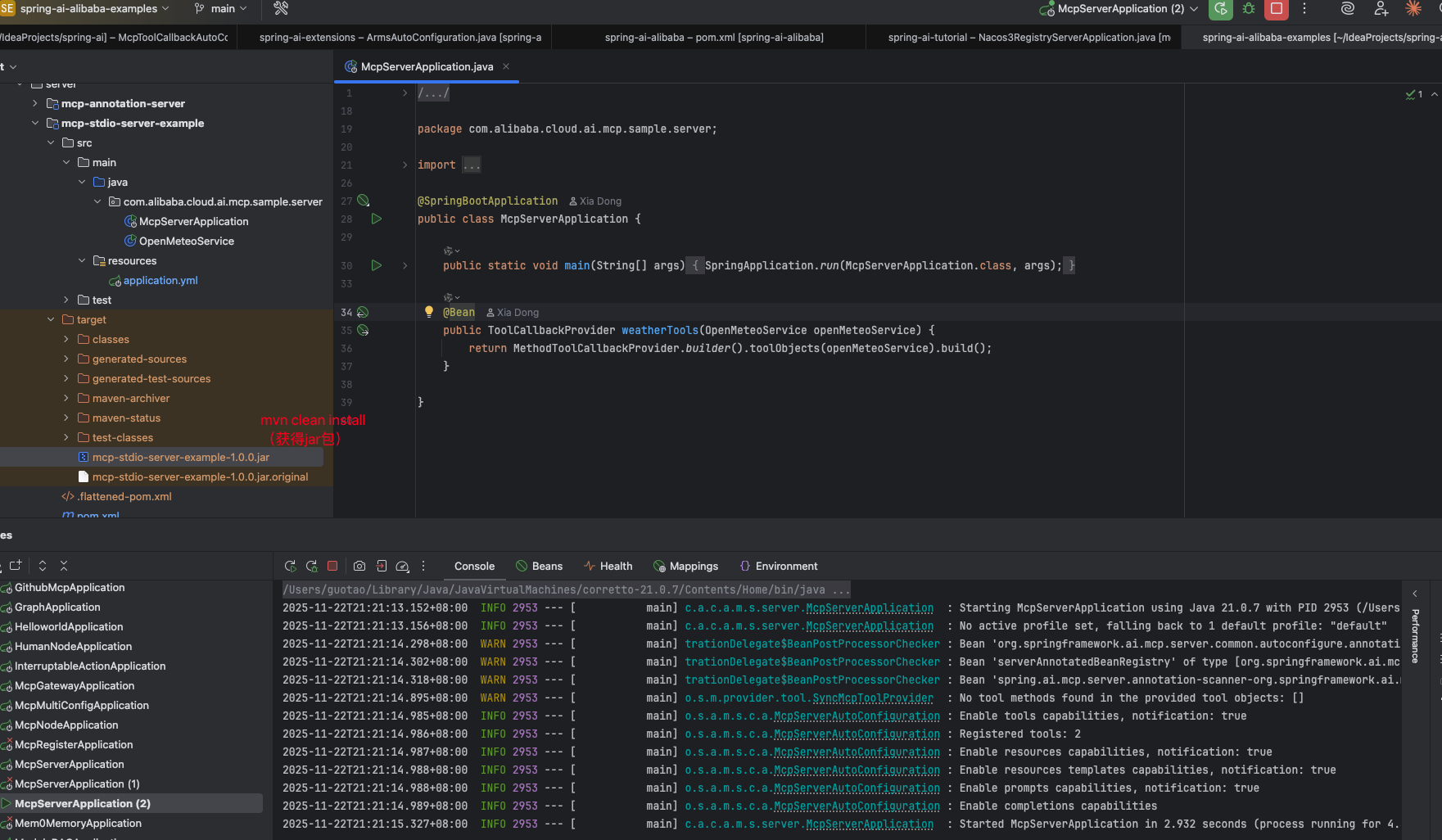
这里取 jar 包的绝对路径:/Users/guotao/IdeaProjects/spring-ai-alibaba-examples/spring-ai-alibaba-mcp-example/spring-ai-alibaba-mcp-starter-example/server/mcp-stdio-server-example/target/mcp-stdio-server-example-1.0.0.jar
client 侧
pom 依赖
<dependency>
    <groupId>org.springframework.ai</groupId>
    <artifactId>spring-ai-starter-mcp-client</artifactId>
</dependency>

<dependency>
    <groupId>com.alibaba.cloud.ai</groupId>
    <artifactId>spring-ai-alibaba-starter-dashscope</artifactId>
</dependency>
application.yml
spring:
  application:
    name: mcp
  main:
    web-application-type: none
  ai:
    dashscope:
      api-key: ${AIDASHSCOPEAPIKEY}
    mcp:
      client:
        stdio:
          servers-configuration: classpath:/mcp-servers-config.json
mcp-servers-config.json 文件如下,其中-jar 路径后填上上述 server 处得到的 jar 包的绝对路径
{
    "mcpServers": {
        "weather": {
            "command": "java",
            "args": [
                "-Dspring.ai.mcp.server.stdio=true",
                "-Dspring.main.web-application-type=none",
                "-Dlogging.pattern.console=",
                "-jar",
            "/Users/guotao/IdeaProjects/spring-ai-alibaba-examples/spring-ai-alibaba-mcp-example/spring-ai-alibaba-mcp-starter-example/server/mcp-stdio-server-example/target/mcp-stdio-server-example-1.0.0.jar"
            ],
            "env": {}
        }
    }
}
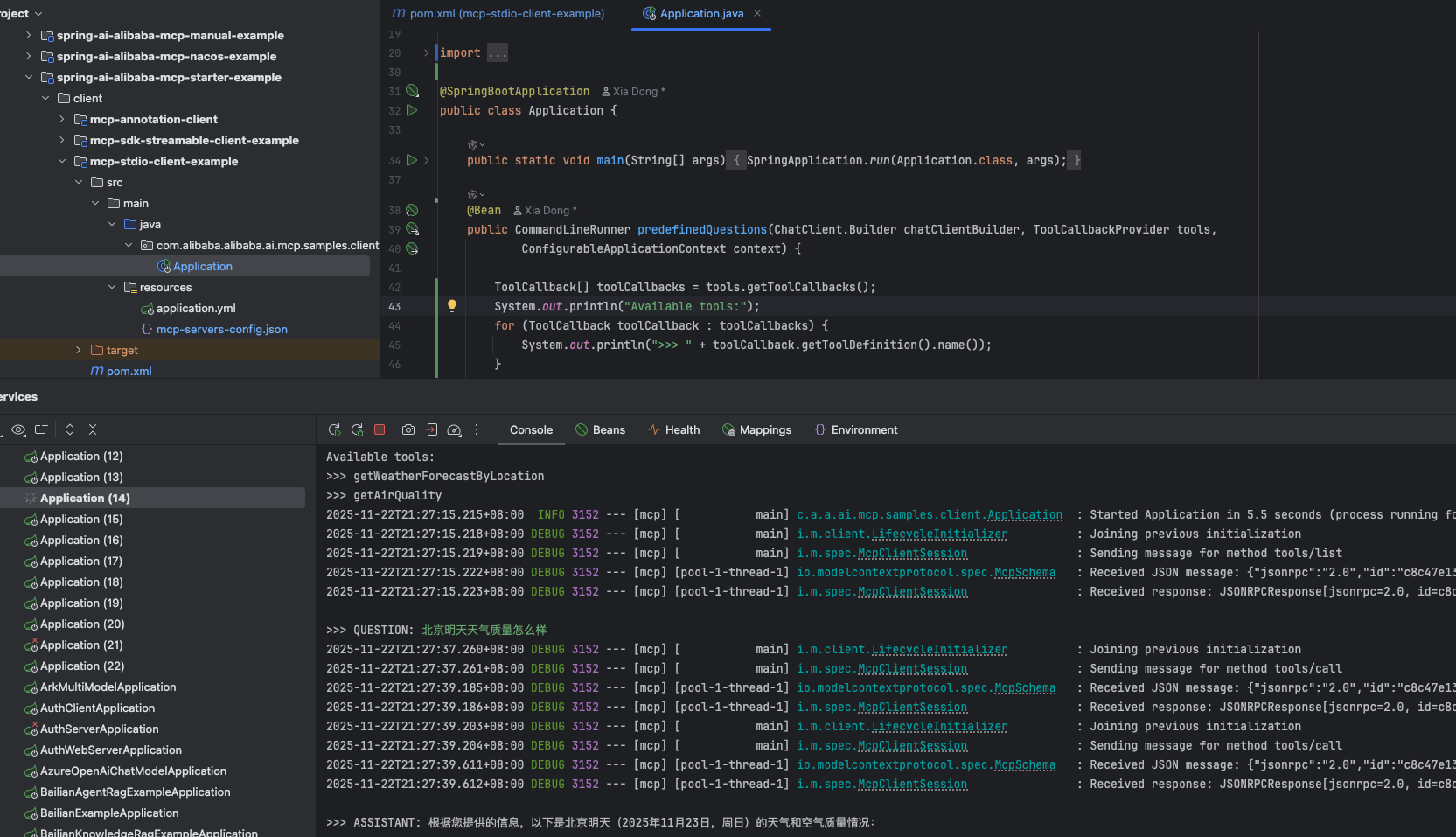
效果演示如下
SSE
示例代码可见:
- server:https://github.com/spring-ai-alibaba/examples/tree/main/spring-ai-alibaba-mcp-example/spring-ai-alibaba-mcp-starter-example/server/mcp-webflux-server-example
- client:https://github.com/spring-ai-alibaba/examples/tree/main/spring-ai-alibaba-mcp-example/spring-ai-alibaba-mcp-starter-example/client/mcp-webflux-client-example
server 侧
pom 依赖
<dependencies>
    <dependency>
        <groupId>org.springframework.ai</groupId>
        <artifactId>spring-ai-starter-mcp-server-webflux</artifactId>
    </dependency>

    <dependency>
        <groupId>org.springframework</groupId>
        <artifactId>spring-web</artifactId>
    </dependency>
</dependencies>
application.yml 文件
server:
  port: 8080
spring:
  main:
    banner-mode: off
  ai:
    mcp:
      server:
        name: my-weather-server
        type: ASYNC  # Recommended for reactive applications
        # 配置 sse 的根路径,默认值为 /sse
        # 下面的最终路径为 ip:port/sse/mcp
        protocol: sse
        sse-endpoint: /sse
        sse-message-endpoint: /mcp
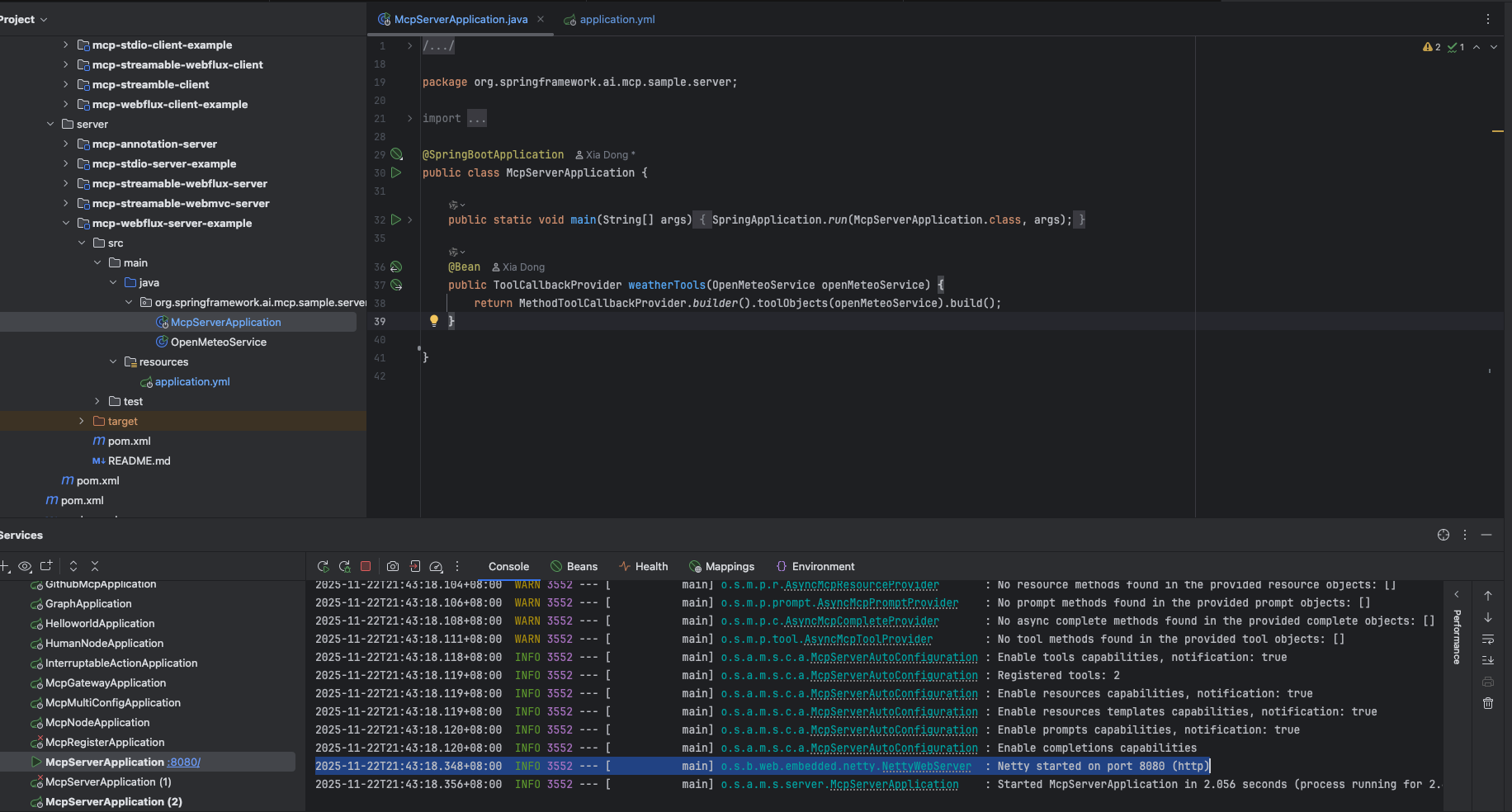
启动类及工具类和上述保持一致,以 8080 端口对外暴露 sse 服务
client 侧
pom 依赖
<dependencies>

    <dependency>
       <groupId>org.springframework.ai</groupId>
       <artifactId>spring-ai-starter-mcp-client-webflux</artifactId>
    </dependency>

    <dependency>
       <groupId>com.alibaba.cloud.ai</groupId>
       <artifactId>spring-ai-alibaba-starter-dashscope</artifactId>
    </dependency>

</dependencies>
application.yml 文件。注意,这里连接的 sse 的 url 地址
server:
  port: 8888

spring:
  application:
    name: mcp-webflux-client-example
  main:
    web-application-type: none
  ai:
    dashscope:
      api-key: ${AIDASHSCOPEAPIKEY}
    mcp:
      client:
        sse:
          connections:
            server1:
              # 实际的连接地址为:http://localhost:8080/sse/mcp
              url: http://localhost:8080/
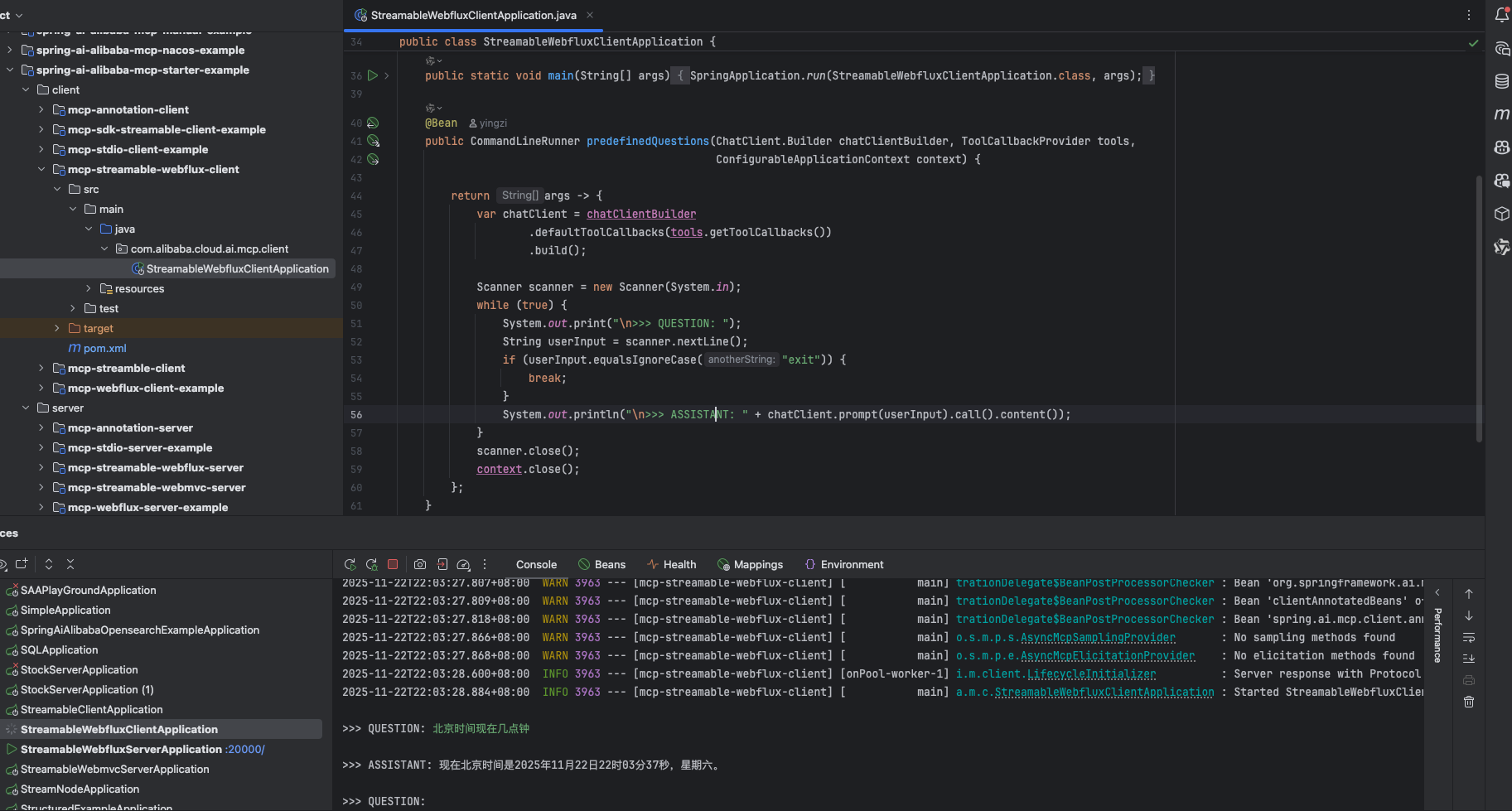
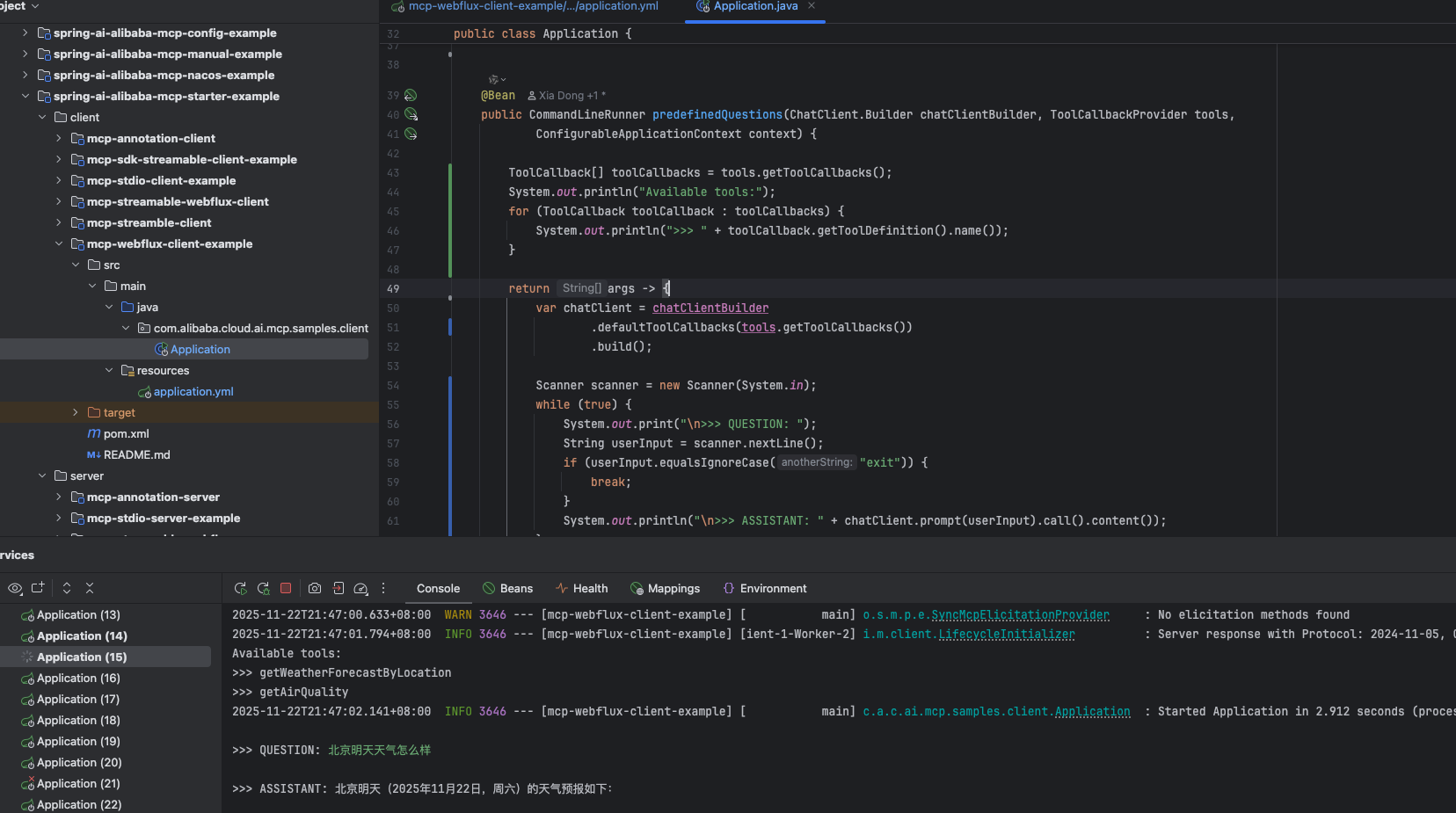
启动类和上文保持一致,效果如下
Streamable-HTTP
Streamable-HTTP 的切换,只需要在 applicatiom.ym 文件中切换 spring.ai.mcp.server.protocol 字段即可
示例代码可见:
- server:https://github.com/spring-ai-alibaba/examples/tree/main/spring-ai-alibaba-mcp-example/spring-ai-alibaba-mcp-starter-example/server/mcp-streamable-webflux-server
- client:https://github.com/spring-ai-alibaba/examples/tree/main/spring-ai-alibaba-mcp-example/spring-ai-alibaba-mcp-starter-example/client/mcp-streamable-webflux-client
server 侧
pom 依赖
<dependencies>
    <dependency>
        <groupId>org.springframework.ai</groupId>
        <artifactId>spring-ai-starter-mcp-server-webflux</artifactId>
    </dependency>
</dependencies>
application.yml
server:
  port: 20000

spring:
  application:
    name: mcp-streamable-webflux-server
  ai:
    mcp:
      server:
        name: streamable-mcp-server
        protocol: STREAMABLE # SSE、STREAMABLE、STATELESS
        version: 1.0.0
        type: ASYNC  # Recommended for reactive applications
        instructions: "This reactive server provides time information tools and resources"
        request-timeout: 20s
        streamable-http:
          mcp-endpoint: /mcp
          keep-alive-interval: 30s
          disallow-delete: false
启动类及工具类
@SpringBootApplication
public class StreamableWebfluxServerApplication {

    public static void main(String[] args) {
        SpringApplication.run(StreamableWebfluxServerApplication.class, args);
    }

    @Bean
    public ToolCallbackProvider timeTools(TimeService timeService) {
        return MethodToolCallbackProvider.builder().toolObjects(timeService).build();
    }
}

@Service
public class TimeService {

    private static final Logger logger = LoggerFactory.getLogger(TimeService.class);

    @Tool(description = "Get the time of a specified city.")
    public String  getCityTimeMethod(@ToolParam(description = "Time zone id, such as Asia/Shanghai") String timeZoneId) {
        logger.info("The current time zone is {}", timeZoneId);
        return String.format("The current time zone is %s and the current time is " + "%s", timeZoneId,
                getTimeByZoneId(timeZoneId));
    }

    private String getTimeByZoneId(String zoneId) {

        // Get the time zone using ZoneId
        ZoneId zid = ZoneId.of(zoneId);

        // Get the current time in this time zone
        ZonedDateTime zonedDateTime = ZonedDateTime.now(zid);

        // Defining a formatter
        DateTimeFormatter formatter = DateTimeFormatter.ofPattern("yyyy-MM-dd HH:mm:ss z");

        // Format ZonedDateTime as a string
        String formattedDateTime = zonedDateTime.format(formatter);

        return formattedDateTime;
    }
}
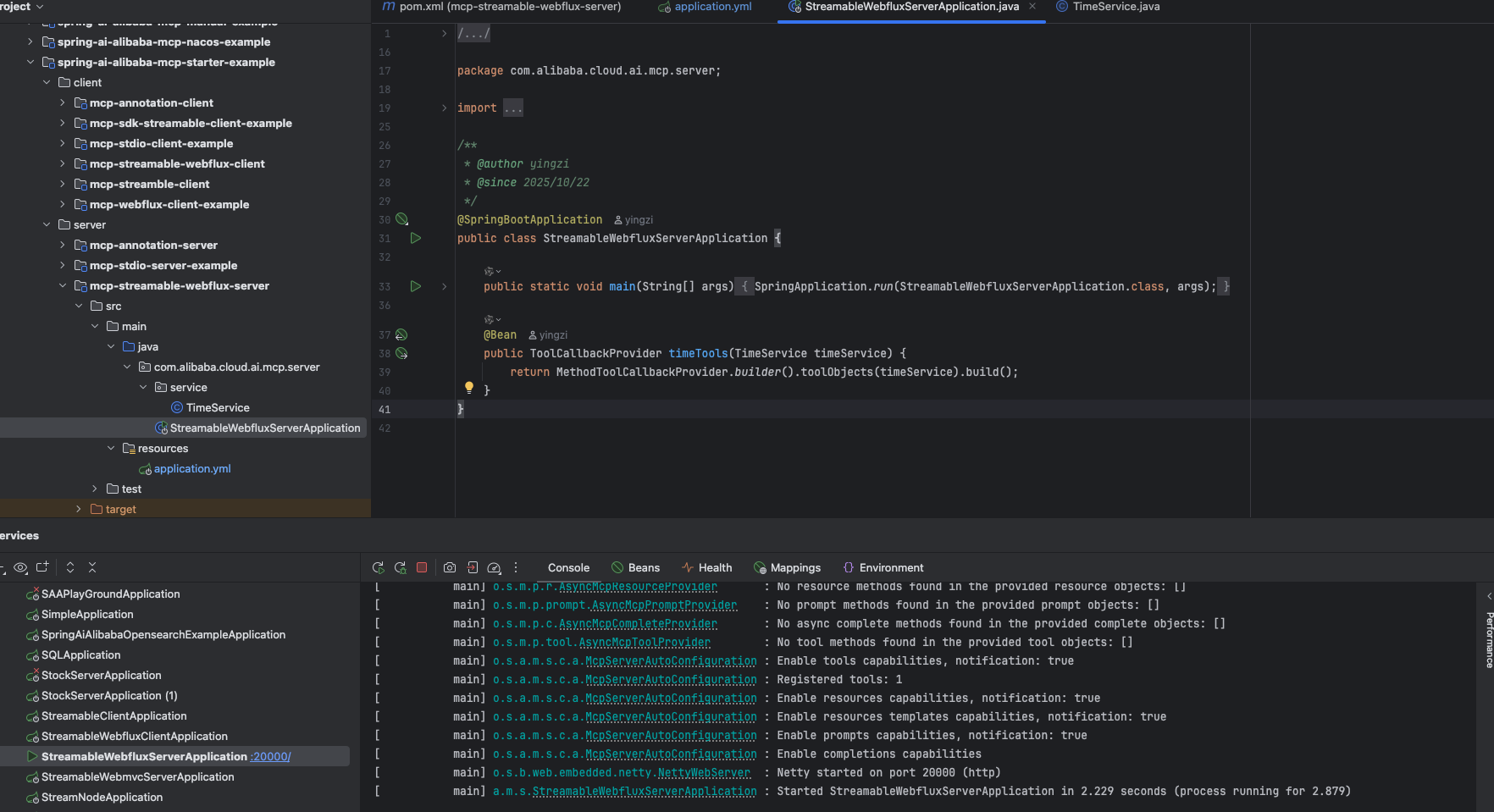
以 20000 端口,对外提供时间工具服务
client 侧
pom 依赖
<dependencies>

    <dependency>
        <groupId>org.springframework.ai</groupId>
        <artifactId>spring-ai-starter-mcp-client-webflux</artifactId>
    </dependency>

    <dependency>
        <groupId>com.alibaba.cloud.ai</groupId>
        <artifactId>spring-ai-alibaba-starter-dashscope</artifactId>
    </dependency>

</dependencies>
application.ym 文件,这里主要 stream-http 的配置,连接 mcp server 侧提供的 stream-http 服务
server:
  port: 19100

spring:
  application:
    name: mcp-streamable-webflux-client
  main:
    web-application-type: none
  ai:
    dashscope:
      api-key: ${AIDASHSCOPEAPIKEY}

    mcp:
      client:
        enabled: true
        name: my-mcp-client
        version: 1.0.0
        request-timeout: 600s
        type: ASYNC  # or ASYNC for reactive applications
        streamable-http:
          connections:
            server1:
              url: http://localhost:20000
              endpoint: /mcp
启动类和上文保持一致,效果如下